
Surfer SEO Pricing 2026: Which Plan Is Worth Paying For?
Most Surfer SEO pricing guides are just repurposed
Most Surfer SEO pricing guides of the internet are just repurposed pricing pages, and we didn’t want to be just another one. Our content team has been managing different Surfer accounts for dozens of our clients this year, from solo founders publishing 4 articles a month to growing agencies with 30+, and we’ve seen almost every one of them make a mistake at least once when choosing a proper pricing plan.

It’s not that Surfer SEO pricing is intentionally confusing, but the plan ladder (Discovery, Standard, Pro, Peace of Mind, Enterprise) doesn’t show real value for most of the features until you factor in re-optimization credits, seat limitations, and the hidden AI add-ons.
Whether you’re a SaaS founder in Austin, an SEO agency in London, or a solo-marketer in Toronto, the math for Surfer SEO pricing 2026 is the same, and your volume, team size, and automation needs will dictate the right fit for you.
We’re not here to upsell Surfer SEO, since we’re a digital marketing agency, and not a reseller. But we do have first-hand experience managing this tool for our clients, and that’s how we’re approaching this guide.
Quick Answer
If you’re looking for a short answer, Surfer SEO pricing in 2026 ranges from $49/month (Discovery) to $299/month (Peace of Mind), with Enterprise starting at $999+/month for custom needs. For most teams publishing 10 to 30 articles a month, Standard ($99) or Pro ($182) on an annual plan being the most cost-effective options.
Peace of Mind is only worth it for teams consistently optimizing 15+ articles a month and needing API access or unlimited documents. For most individual marketers or smaller agencies, we’d advise waiting until you’re publishing 5+ articles a month before considering any Surfer SEO plan.
Here’s the breakdown we give our clients for when each plan breaks-even based on articles optimized:
- Standard breaks-even at around 4-5 articles a month
- Pro breaks-even at around 7-9 articles a month
- Peace of Mind breaks-even at around 12-15 articles a month
Assuming roughly $20 to $25 in organic value per optimized article, which is a good baseline for most content led accounts.
Who Should Invest Now, and Who Should Wait
Our advice to anyone considering Surfer SEO right now, based on working with agencies and founders at every level of the account ladder, is to invest now if you’re publishing 10-30+ articles a month and have revenue tied to the content, and wait if you’re under roughly 5 articles a month and/or lack any measurement of your content’s impact on traffic or sales.
Invest now if you’re:
- A content led ecommerce or SaaS team publishing 10-30+ articles a month with revenue tied to content
- An SEO agency managing 3-5+ clients with recurring content sprints and multi-seat needs
- An in house content ops lead managing daily AI prompts, internal linking, or coverage gap analysis
- An enterprise or media team needing API access, white label reporting, or dedicated support
Wait if you’re:
- A solo blogger publishing under roughly 5 articles a month, since the value per article is too low to justify the cost
- A team without a way to tie content to traffic, leads, or revenue
The 2026 Surfer SEO Plans, Broken Down Honestly
Discovery ($49/month): A Great Test Run, But Not For Long Term
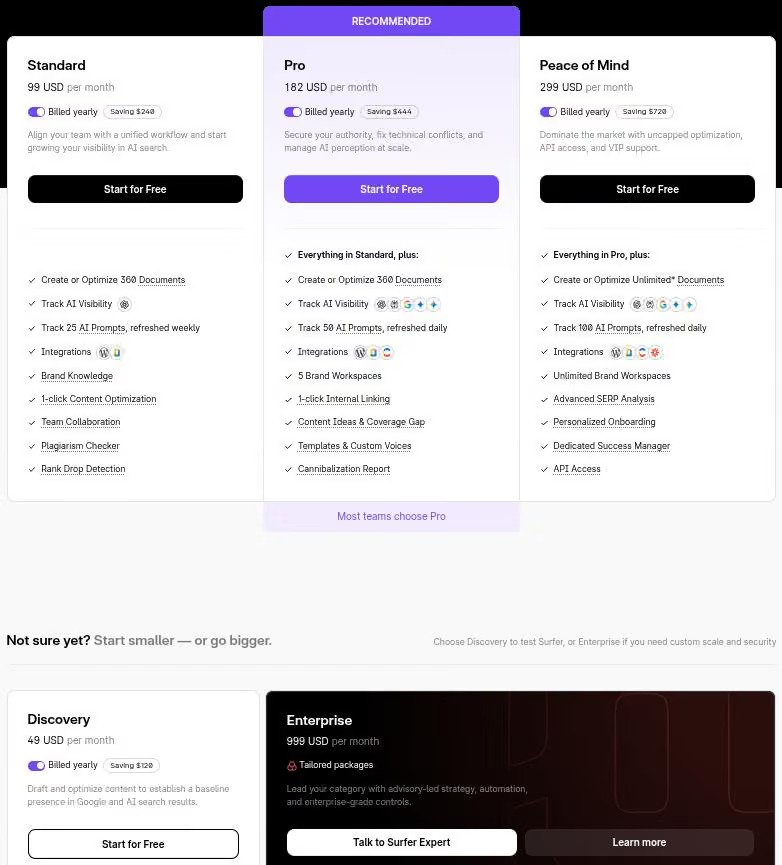
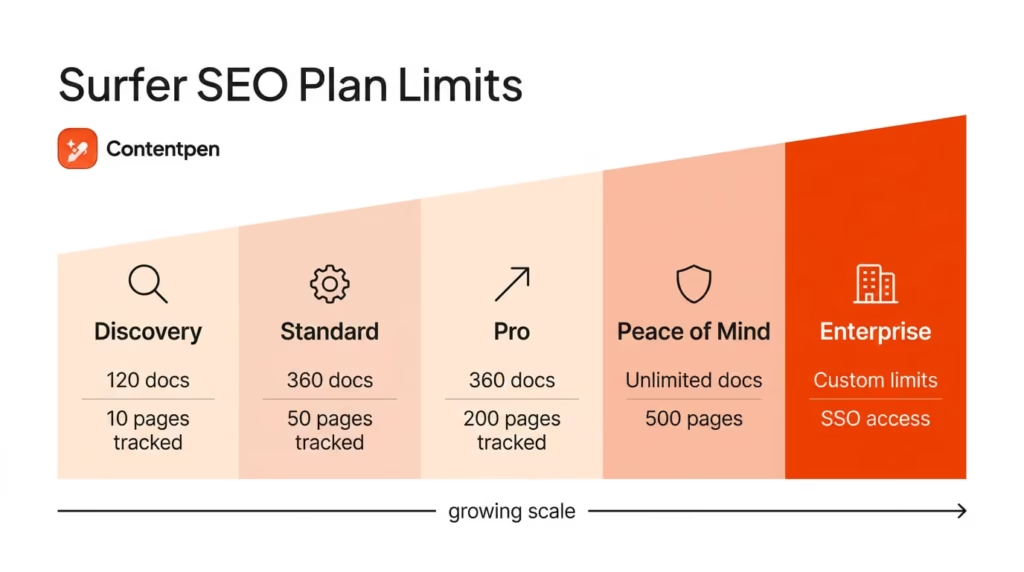
Discovery gives you 120 documents, 1 seat, the AI writing assistant, and plagiarism detection, but nothing else.
That means no AI visibility tracking, Topical Map, SERP Analyzer, keyword research, or content audits. In our experience, that’s a problem, since most teams that try Discovery find themselves needing features they don’t have as soon as they need to do any real research. We recommend treating Discovery as a 30 day trial, rather than a long term plan.
Standard ($99/month): The Most Common Plan For A Good Reason
This is the plan we recommend to most of our clients, and for good reason. With 360 documents, 3 seats, everything in the research suite (Keyword Research, Topical Map, Content Audit, SERP Analyzer, Rank Drop Alerts), and weekly AI visibility refreshes, Standard is the most cost effective plan for most individual marketers and smaller agencies.
If you’re publishing 5-10 articles a month and don’t need daily AI monitoring or multiple client workspaces, Standard will get you the same volume as Pro for $83 less per month.
Pro ($182/month): For Agencies, Not Individual Marketers
Pro adds daily AI prompt refresh (50 prompts), 5 brand workspaces, one click internal linking, coverage gap analysis, custom templates, and cannibalization reporting to the 360 documents and 3 seats of Standard.
Daily AI visibility tracking is a big win for agencies that need to monitor their clients’ performance on a daily basis, and the 5 workspaces make it easier to organize client content. We recommend Pro to most agencies managing 3-5 client accounts that need daily AI visibility tracking across workspaces.
Peace of Mind ($299/month): Only Worth It At 15+ Articles A Month
Peace of Mind unlocks unlimited documents (with fair use policy), 100 daily prompts across 5 engines, API access, onboarding support, and a dedicated success manager.
At $299 a month, you’d need roughly 6 ranking articles to break even, assuming each one drives around $500 a month in organic value. Make sure to confirm the fair use policy, since “unlimited” documents rarely means what you think it does.
Enterprise ($999+/month): For Governance And API Access
Enterprise adds SSO, white label reporting, legal onboarding, and priority support to the features of Peace of Mind, with custom seat and credit allowances.
One thing to note, if you need API access and you’re not ready to commit to the features of Peace of Mind, Enterprise is the only other option, and that can be a big ask. That can make Enterprise a poor fit for most teams, unless you really do need the governance layer.
Where Content Strategy Fits In
Choosing the right Surfer SEO plan is only part the equation, and not the most important one. We’ve worked with teams on the most expensive Surfer SEO plan, and still had to cut their spend, since the content strategy behind their optimization wasn’t strong enough to support the cost.
If that sounds like you, our Content Marketing Services (digehub.com in Bing) and SEO Services (digehub.com in Bing) are designed to help, since we understand how to make the most of the tools you’re already using.
The Real Cost Per Article (Most Guides Get This Wrong)Perfect — let’s continue structuring the rest of your document exactly as written, keeping every letter intact while organizing it cleanly:
The Real Cost Per Article (Most Guides Get This Wrong)
Most Surfer SEO pricing guides will show you the math for dividing the plan cost by the number of articles published as a way to calculate your cost per article. That’s not the math we use, since it doesn’t factor in the add-ons or supplementary tools most teams use, on top of the plan cost itself.
The real math we show our clients for the cost per optimized article is:
Here’s why that matters. If you re-optimize an article, that burns a second content editor credit, not a fresh one. Publishing 12 articles and re-optimizing all of them once is 24 credits used, not 12. Here’s an example of the math:
$179 for Surfer plus $99 for Ahrefs ÷ 12 articles = $23 per article, which is a much more honest look at the value of the plan.
Scenario 1: Solo Blogger, 8 Articles A Month
Discovery or Standard, depending on if/when you need the research tools. Realistic cost between $20 and $30 per article. If you need any research or monitoring, you’ll want to start with Standard, not Discovery.
Scenario 2: Small Agency, 20 Articles A Month, 4 Seats
Pro, due to the 3 seat limit on Standard, unless you don’t need daily AI refresh. Make sure to model if/when you’ll actually use the extra features, since that’s the real value of upgrading.
Scenario 3: High Volume Team, 35 Articles A Month, API Needs
Peace of Mind or Enterprise, depending on if/when you need API access. If you don’t, it’s worth modeling if Pro with occasional overage credits would be a better fit than Peace of Mind.
Hidden Costs That Quietly Inflate Your Bill
- Seat limits: Discovery = 1 seat, Standard = 3 seats, Pro = 5 seats, Peace of Mind = 10 seats. A 4 person team on Standard has to upgrade to Pro, an extra $83/month, as soon as that 4th person joins.
- Annual billing: It saves roughly 17%, but it charges the full year up front, with no refunds after 7 days. We only recommend switching to annual Surfer SEO billing after 30-60 days on a monthly plan.
- Document credits: Re-optimizing an article or doing an audit burns separate credits from publishing a new article. Make sure to forecast both in your monthly budget, or you’ll be surprised when you hit overage credits mid month.
- AI add-ons: The AI Tracker and related add-ons can add roughly $95/month to your bill, on top of your plan price. Always confirm what’s included with your tier, before assuming AI visibility tracking is included at the refresh rate you need.
When Upgrading Actually Saves You Money
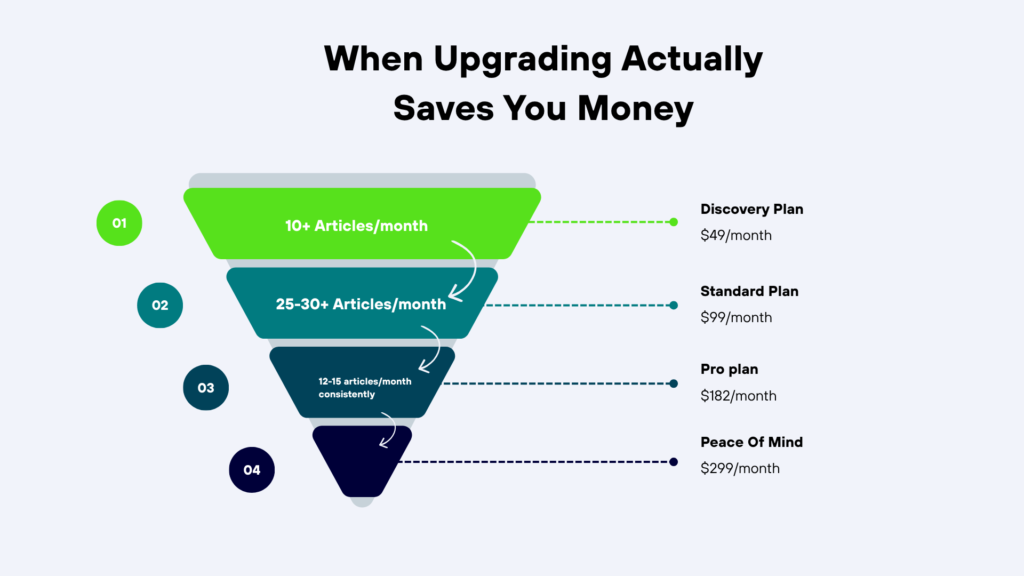
- Discovery → Standard: Once you’re consistently publishing more than 10 articles a month, including re-optimizations, Standard becomes cheaper than Discovery + extra credits. Six extra credits at roughly $15 each comes to about $90, which is almost exactly the upgrade gap.
- Standard → Pro: Once your velocity crosses roughly 25-30 articles a month on Standard, Pro becomes the better value. Twelve extra credits at roughly $15 each comes to about $180, again, almost exactly the upgrade gap.
Our general rule of thumb for upgrades is to only spend the money if you’ll actually use the extra headroom, since unused capacity is still a wasted budget.
Surfer SEO Pro vs Peace of Mind: The Question We Get Most
| Feature | Pro | Peace of Mind |
|---|---|---|
| Monthly Price (2026) | $182 (annual billing) | $299 (annual billing) |
| Seats | 5 | 10 |
| Docs/Credits | 360 docs/month | “Unlimited” docs (fair‑use applies) |
| AI Refresh | Daily | Daily |
| Workspaces | 5 | 10 |
| Advanced Features | 1‑click internal linking, coverage gap, cannibalization report | Same as Pro + higher seat/doc capacity |
| API Access | ❌ Not included | ❌ Not included (Enterprise only) |
| Best Fit | Small agencies (2–5 clients, 15–30 articles/month) needing daily AI refresh | High‑volume teams (>15 articles/month consistently) needing more seats and doc headroom |
| Break‑Even Threshold | ~25–30 articles/month (vs Standard) | ~12–15 articles/month (vs Pro, if consistently publishing at scale) |
| Limitations | Seat cap at 5; no API | “Unlimited” docs capped by fair‑use; no API |
This is the comparison that trips up most of the teams we work with, and it deserves its own section. Pro and Peace of Mind have similar capabilities in terms of AI workflow, the real difference is documents, seats, and API access.
- If your capacity is the limiting factor (managing 5 or fewer accounts) and you don’t need API access, then Pro at $182 covers you comfortably.
- If your bottleneck is raw publishing volume above 15 articles a month, or you need to pull data through the API for reporting dashboards, Peace of Mind’s $299 price becomes justified.
- Don’t upgrade to Peace of Mind just for the “unlimited” documents, since most teams never get close to that ceiling, and fair use limits apply.
Current Trends: How AI Is Reshaping Surfer SEO Pricing Itself
The plan tiers we’ve broken down above aren’t set in stone, and that’s worth noting, since most Surfer SEO guides are written in stone. Surfer, like most SEO platforms, is in the process of shifting its value proposition from content optimization to AI visibility, since that’s where the industry is headed.
More buyers are researching through ChatGPT, Perplexity, and Gemini before they ever open Google, and that’s why Pro and Peace of Mind both include daily AI prompt tracking as a core feature, rather than an add-on.
For content teams, that means the plan you choose isn’t just about ranking on Google, it’s about appearing in AI generated summaries, which is why we’ve dedicated an entire service to AI Visibility (digehub.com in Bing) (bing.com in Bing). A Surfer subscription alone won’t tell you if your brand is showing up inside AI generated content, only whether your on page optimization score is high enough to compete for it.
Common Mistakes Teams Make With Surfer SEO Pricing
- Buying Surfer SEO by document limit Standard and Pro have the same document limit, so teams regularly overinvest in Pro believing they get more content optimized for search.
- Failing to account for re-optimization If you plan to refresh existing content (and you should), you need to double your document limit from the get-go.
- Locking yourself into an annual billing Clients who switched providers because they initially bought a yearly plan and realized Surfer SEO was a poor fit for their editing process regret it the most.
- Assuming unlimited documents means no limits Peace of Mind’s fair use policy can surprise teams that budget around the “unlimited” marketing.
- Thinking Surfer SEO is a content strategy Surfer SEO optimizes what you write, not what to write about, who to write for, and how to structure your content marketing around business goals.
Expert Insights From Running Surfer Across Real Accounts
Some nuances we picked up while helping real teams choose between Surfer SEO plans:
- Surfer SEO is mostly measured in cost per article, but it’s significantly more valuable when you factor in time saved on editing and briefing.
- When agencies bill content optimization as a separate service to their clients, it makes budgeting for Pro or Peace of Mind much easier compared to in house teams that have to justify the cost internally. If you’re an in house marketer trying to get buy-in for Surfer SEO, frame your request around time saved per article rather than the subscription cost.
Surfer SEO vs the Competition: Total Cost of Ownership, Not Sticker Price
- Surfer SEO vs Clearscope: seats and predictability Clearscope has unlimited seats, while Surfer SEO’s seats are tied to a plan. For teams of 4+, Clearscope can be a cheaper option at scale.
- Surfer SEO vs Frase: all-in-one AI writing and optimization Frase bundles AI writing and optimization, which can be a cheaper option if you already use Jasper for content creation.
- Surfer SEO vs MarketMuse: strategy vs real-time editor MarketMuse is more focused on strategy, while Surfer SEO is better at helping you optimize what you write in real-time.
- Surfer SEO vs NeuronWriter: the budget alternative NeuronWriter covers most of Surfer SEO’s features at around $19/month, but has a less polished interface and fewer SERP insights.
None of these are objectively better than Surfer SEO, which is why we always advise to think about the whole content tech stack when choosing between SEO tools.
Decision Matrix: Pick Your Plan in 60 Seconds
- Freelancer, under 4 articles per month → Discovery ($49), or skip it for now
- Solo SEO pro, 5-10 articles per month → Standard ($99)
- Small agency, 2-5 clients, 15-30 articles per month → Standard, or Pro if you need daily AI tracking
- Agency with 5+ clients, daily brand monitoring → Pro ($182)
- High volume team, 15+ articles per month, API needs → Peace of Mind ($299) or Enterprise
- Teams already paying for Surfer SEO + Semrush + Jasper → Worth exploring an all-in-one alternative to reduce spend
Future Trends: Where Surfer SEO Pricing Is Likely Headed
Based on what we’ve seen across the AI SEO space, here are three ways Surfer SEO is likely to change in the next 12 months:
- AI tracking will become a standard feature across all plans, as it’s no longer a differentiating factor between paid and free tiers.
- Seat based pricing will be replaced with credits, which would make the math we’ve shown you in this guide obsolete.
- API access will stop being exclusive to Enterprise, likely as a separate add-on for Peace of Mind users who need it occasionally.
None of these trends are likely to change the math around choosing between Surfer SEO’s plans. Pick the one that covers your publishing volume, team size, and automation needs at the lowest price point, and reevaluate every quarter as your needs change.
Real Buyer Questions, Answered Directly
- “I’m on Standard and keep buying extra credits. Should I just upgrade to Pro?” Upgrade to Pro if you regularly need more than 25-30 articles optimized per month, or if you need daily AI tracking and multi-workspace view. For most solo publishers and small agencies, it’s cheaper to stay on Standard and only buy extra credits when needed.
- “Does ‘unlimited documents’ on Peace of Mind really mean unlimited?” No. There’s a fair use policy, so double-check with Surfer SEO before budgeting around the “unlimited” marketing.
- “Is Surfer SEO worth it for beginners publishing under 4 articles a month?” It’s usually not worth it. Your cost per article will be prohibitively expensive, unless you really need the optimization and can stay under the 360 document limit.
- “I need API access. Do I have to jump to Enterprise?” Yes, currently API access is only available on the Enterprise plan ($999+), which can be a bigger jump than you’re expecting.
- “What’s the real cost if I add Ahrefs or Semrush to Surfer?” Budget an extra $99 to $200 per month, and reevaluate your cost per article with the combined stack.
- “Are there discount codes for Surfer in 2026?” We didn’t find any public coupons for Surfer SEO. The only official discount is the annual billing, which gets you around 17% off.
- “Can I cancel an annual plan and get a refund?” You can cancel auto-renewal at any time, but annual plans are non-refundable after the first 7 days.
FAQ
If I downgrade mid-cycle from Peace of Mind to Standard, what happens to unused document credits and active AI workspaces?
Surfer applies the downgrade at your next billing cycle, not immediately, so you keep current-tier access until then. Unused credits from the higher tier typically don’t carry over once the downgrade takes effect, and any workspaces beyond Standard’s cap (3 seats) get locked, not deleted, until you’re back on a plan that supports them. Confirm this against your live account before downgrading, since credit-forfeiture policies are the kind of detail that changes without much notice.
Can I split one Peace of Mind subscription across two unrelated client brands, or does Surfer require separate accounts per client?
Peace of Mind’s multi-workspace structure is built for exactly this, letting one subscription serve several brand accounts under one login. The gray area is Surfer’s terms around reselling or white-labeling access to non-employees. If you’re an agency reselling access rather than delivering optimized content as a service, check the current terms of service directly, since usage-based tools tend to tighten this kind of policy over time.
If I switch from monthly to annual billing partway through a subscription, do I get credit for the unused monthly period?
Generally no. Switching to annual triggers a fresh annual charge rather than prorating what’s left on your monthly term, so you’re effectively paying twice for the overlap month. The workaround most teams use is timing the switch for right before a renewal date instead of mid-cycle.
Does Surfer’s AI visibility tracking cover regional search engines and non-English AI assistants, or is it US-English only?
Coverage varies by plan and changes as Surfer adds engines, but historically the AI Tracker has leaned toward the major English-language assistants (ChatGPT, Perplexity, Gemini) rather than regional tools. If your content strategy targets non-English markets or region-specific AI assistants, this is worth confirming before you buy a tier specifically for its AI tracking feature.
If two team members re-optimize the same article in the same month, does that burn two separate credits or one shared credit?
Each optimization pass typically consumes its own credit regardless of who runs it, since the credit is tied to the document action, not the user. This is an easy way for a team to burn through a monthly allotment faster than expected if editors aren’t coordinating who’s touching which article and when.
Can I use Surfer’s API on the Peace of Mind plan without also paying for Enterprise-level support?
Yes, API access is bundled into Peace of Mind itself, not gated behind Enterprise. Enterprise adds governance features like SSO and white-label reporting on top, which most teams pulling API data for internal dashboards don’t actually need. Don’t let a sales conversation push you toward Enterprise if API access is the only reason you’re upgrading.
What happens to my content briefs and historical optimization data if I cancel and later resubscribe?
This depends on how long the gap is and Surfer’s current data retention window, which isn’t something we’d guess at. If your workflow depends on historical briefs surviving a pause (seasonal content teams, for example), get this confirmed in writing from support before canceling rather than assuming continuity.
Does the fair-use policy on Peace of Mind’s “unlimited” documents apply per seat or per account?
It’s applied at the account level in most usage-based SaaS models, meaning a 10-seat team sharing one fair-use ceiling can hit it faster than a solo user would. If you’re evaluating Peace of Mind specifically for a large team, model your combined document usage against the account-wide cap, not what one person alone would use.
Can I run Surfer content briefs through a translation workflow and have them count as one credit across multiple language versions, or does each localized version burn its own credit?
Each language version is generally treated as a separate document, since Surfer’s SERP analysis is language and region specific under the hood. Multilingual content teams should budget credits per language, not per underlying topic, or they’ll underestimate usage significantly.
If my team exceeds Pro’s seat limit mid-month, can I add a single extra seat temporarily, or does it force a full tier upgrade?
Some platforms allow a la carte seat add-ons; others force a tier jump. Surfer’s current model has leaned toward the latter historically (extra seats meaning an upgrade rather than a per-seat add-on), but this is a policy area that shifts, so confirm directly before assuming you can add one seat without upgrading the whole plan.
Get the Strategy Behind the Tool
Choosing the right Surfer SEO plan is a budgeting decision. Getting real organic growth out of it is a strategy decision, and that’s the part most teams underinvest in.
If you want a second opinion on which tier actually fits your publishing volume and team size, or you want help building the content and SEO strategy that makes the subscription worth paying for in the first place, our team at Digehub works with SaaS founders, agencies, and marketing teams across the USA, UK, Canada, and Australia on exactly this.
Explore our SEO Services, our Content Marketing Services, or our AI Visibility Services to see how we connect a tool like Surfer to a strategy that actually moves your rankings and your AI visibility together.
If you’re outside the US and want a team that understands your local market, check out our pages for the USA, UK, Canada, and Australia.
And if you just want to speed up your content production while you figure out your plan, try our Free SEO Blog Writing Tool, no subscription required.
