
Cloudways Review 2026: Is It the Best Cloud Hosting for Agencies?
Cloudways is one of my favorite cloud hosting providers for agencies that need to offer high-performance, scalable, and predictable infrastructure to their clients without dealing with the complexity of server maintenance.

Let me share with you my honest opinion on this company after extensive research and using their services for several years. I believe this review will be helpful to you in 2026 because the managed hosting market is getting more competitive by the day with companies such as Kinsta , WP Engine , Rocket.net , SiteGround , and many others offering cutting-edge solutions.
On the other hand, agencies have demanding clients who want everything to be perfect: faster sites, better Core Web Vitals, improved security, higher performance, fewer downtimes, easier collaboration, and much more. In this article, I am going to discuss why agencies should consider managed cloud hosting and why I like Cloudways.
Cloudways review 2026: Cloudways at a Glance
Our Rating
Overall Score
4.8/5
Key Features of Cloudways
Cloudways combines the benefits of cloud infrastructure and managed hosting. Its servers offer reduced administrative overhead without sacrificing flexibility. Let’s go over the features that Cloudways offers to agencies.
1. Cloudways – Flexible Choice of Premium Cloud Providers
Flexibility is the main advantage offered by Cloudways hosting.
Unlike other hosting providers that offer a single proprietary architecture, Cloudways can be deployed across multiple cloud providers with varying pricing, performance characteristics, and global availability.
The supported providers include:
The choice of these providers is determined by the needs of the agency. For example, DigitalOcean is often the preferred option for most agencies, while Vultr High-Frequency is optimal for WordPress hosting. At the same time, AWS and Google Cloud offer the best value for enterprises.
2. Cloudways Hosting – Managed Servers
Hosting servers involves a lot of routine administrative tasks. In turn, managed server hosting removes this burden from the administrators by allowing the provider to handle all operations. Cloudways manages all aspects of server maintenance, including but not limited to:
- Operating system updates
- Server monitoring
- Server security
- Backups
- SSL certificate management
- Application deployment
This way, developers and agency managers do not need to handle server maintenance and can instead focus their time and energy on core competencies.
3. ThunderStack – Cloudways’ Performance Layer
ThunderStack is a proprietary software layer that optimizes performance by combining Nginx, Apache, PHP-FPM, Redis, Memcached, Varnish Cache, and databases, such as MySQL and MariaDB. Each engine is used for a specific set of tasks, with the performance layer serving as a frontend balancer and cache.
In other words, the page is processed and optimized at multiple stages before being sent to the user. Such optimization is beneficial for agencies that handle SEO sites and want to maximize Core Web Vitals.
4. Launch Cloudways Sites in One Click
Cloudways allows deploying WordPress sites within a few mouse clicks. A new WordPress blog can be launched right away, without any coding or setup required. At the same time, the platform is not limited to WordPress. Other CMSs and applications that can be deployed to Cloudways include:
- WooCommerce
- Magento
- Laravel
- Drupal
- Joomla
- PHP applications
Thus, agencies can offer their clients a selection of applications and deploy them with minimal effort.
5. Cloudways Staging Environments
It is always risky to make changes directly on a live website. Instead, Cloudways allows creating a copy of the site at the same domain level and make updates there. The staging environment is useful for:
- Test plugin updates
- Testing theme changes
- Building and testing new features
- Resolving bugs
After the updates are made, they can be pushed to the main domain. This way, websites of agencies can be updated with minimal risk involved.
6. Cloudways – Quick Server Scaling
Websites that are managed by agencies have unpredictable traffic needs. In other words, the number of simultaneous visitors can skyrocket several times during a flash sale, holiday season, or after a viral post. In turn, Cloudways allows scaling the server up when traffic increases, instead of overpaying for resources that are not used.
7. Cloudways Collaboration Tools
An agency typically involves several people in developing and maintaining websites. Those people may have different roles, such as a developer, designer, SEO specialist, and project manager. In turn, Cloudways offers collaboration tools to facilitate project deployments across roles.
The tools include team members management, permissions, and project organization. All these features allow an agency to operate smoother and keep administrative overheads to a minimum.
8. Cloudways Backups
Backups are essential for any website, as they can be restored in case of an emergency. Cloudways offers automated backup scheduling along with on-demand and offsite backup options. In addition, the backup can be restored with a single click, minimizing the site’s offline time.
9. Cloudways – Monitoring Tools
Cloudways monitors the server’s performance, allowing the administrator to view metrics in real-time. The server’s CPU, RAM, storage, bandwidth, and overall performance are viewed and analyzed using the performance dashboard.
Cloudways Cost in 2026
A cloud server has a different cost structure than traditional shared, VPS, or dedicated hosting. Cloudways follows the pay-as-you-go model, which eliminates the need for agencies to prepay for resources and features that are never used.
Approximate starting monthly pricing:
Cloud Provider Starting Prices
Color guide: Green = Fixed starting price · Amber = Variable usage-based pricing
Pricing depends on the particular specifications, storage and bandwidth requirements and the preferred region.
While not being the cheapest of the hosting platforms, Cloudways typically offers much higher flexibility than other managed WordPress hosting options.
This is why agencies tend to benefit from it more, as you can fit more websites on a single server compared to other hosting services.
Cloudways review 2026 : Performance Overview
The main reason for choosing Cloudways is performance.
There are several reasons for this:
- SSD-based cloud storage
- ThunderStack optimization
- Built-in caching
- Global cloud locations
- HTTP/2 support
- PHP version flexibility
- Redis support
- Cloudflare support
These all combine into excellent performance, with decreased server response time.
Server response time has proven to be one of the primary factors in overall website speed, which ultimately impacts SEO performance.
However, it goes without saying that good website performance is never a matter of just “good hosting”.
Website speed ultimately depends on:
- Website optimization
- Image compression
- Theme performance
- Plugin usage
- CDN utilization
- Database optimization
Even the best hosting cannot give you ideal Core Web Vitals, but Cloudways can serve as an excellent basis for building a fast and reliable website.
Expert Note
Hosting should never be considered as a standalone solution.
Agencies that utilize the technical capabilities of Cloudways in combination with optimization, good caching practices, asset optimization, and maintenance will see much better results than those that attempt to rely on infrastructure improvements solely.
The winning combination:
SEO Considerations
Google continues to favor faster and more reliable websites with better core vitals.
Improved server response time ultimately contributes to better performance, as well as better crawl rates – particularly for larger websites that host thousands of pages.
SEO is not just a technical consideration for agencies – it is a strategic one.
Consider moving to the next section to continue learning about agency hosting considerations.
Agency Cost Modeling: Is it Worth Using Cloudways for Many Clients?
Another major consideration for agencies is cost.
In this regard, Cloudways is extremely flexible, allowing to host multiple applications on a single server.
This can be beneficial for agencies that want to decrease the average cost per client.
However, performance ultimately depends on the server’s capacity, and it is easy to overload a server with too many websites.
Let’s consider multiple scenarios.
Scenario 1: Freelancer With 10 Clients
Let’s say that a freelancer wants to host 10 simple brochure WordPress websites with average traffic for small businesses.
All of these websites are relatively similar and have few plugins.
In this case, it is often possible to use a single small server from DO or Vultr to host all 10 clients.
The benefits of this approach are clear:
- Lower cost-per-client
- Simpler maintenance
- Faster performance over shared hosting
Compared to traditional managed WordPress hosting, this method can prove much cheaper.
Particularly when working with 10+ clients, managed WordPress plans can quickly become too expensive.
Scenario 2: Small Agency With 25 Clients
As agencies grow bigger, the infrastructure considerations become more important.
For agencies with 25+ clients, I personally find it much easier to work with Cloudways.
I would use multiple servers to separate “big” and “small” clients.
Within the small clients, I can host multiple WordPress websites on a single server.
You may also want to consider allocating separate servers for WooCommerce stores and websites with higher traffic.
At this stage, agencies also begin to utilize the multi-user functionality of Cloudways.
It is much easier to invite team members to a project now than to manage dozens of separate servers.
Many agencies I know tend to only host a few clients on a single server – not all of them.
This way, you get much better isolation between applications, which avoids the possibility of one poorly-coded website bringing the entire server down.
Scenario 3: Medium Agency With 50+ Clients
At 50+ hosted websites, resource planning becomes even more important.
It is rare that you’ll want to simply throw 50 WordPress websites on a single server at this point.
Instead, I would advise you to consider what traffic each website has and what resources they need.
It is best to categorize websites based on something like:
- Website traffic
- WooCommerce vs. brochure WordPress
- Website importance
- Required resources
- Geographical location of users
This way, you can optimize resources across your server fleet.
Comparison: Cloudways vs Managed WordPress Pricing
It is important to note that most “premium” managed WordPress providers typically only offer plans that scale with the number of websites.
Cloudways, on the other hand, is much more flexible – you pay for the resources directly.
This approach allows to host more clients on a single server.
As such, agencies with many clients will ultimately benefit much more from using Cloudways.
However, the same flexibility comes with additional responsibilities – you are now the one who decides how resources are allocated.
Website Infrastructure: How Agency-Friendly are Cloudways?
When it comes to infrastructure, speed is certainly not the only consideration.
How easy it is to launch a client project, migrate a website into Cloudways, maintain staging instances and handle traffic spikes also contribute to overall effectiveness.
Let’s review these one by one.
Getting Started With New Clients
In most cases, getting a new client website up and running in Cloudways is a breeze.
The entire process generally takes anywhere between 15 and 35 minutes, depending on how many customizations are needed.
The approximate steps are as follows:
- Launch a new application
- Install WordPress
- Set up SSL certificate
- Connect the domain
- Set up plugins
- Add team members
- Deploy the website
This is much faster than attempting to spin up a new cloud instance on AWS or Google Cloud.
Many of these steps can be automated or streamlined using Cloudways’ custom scripts.
Migrating Existing Projects
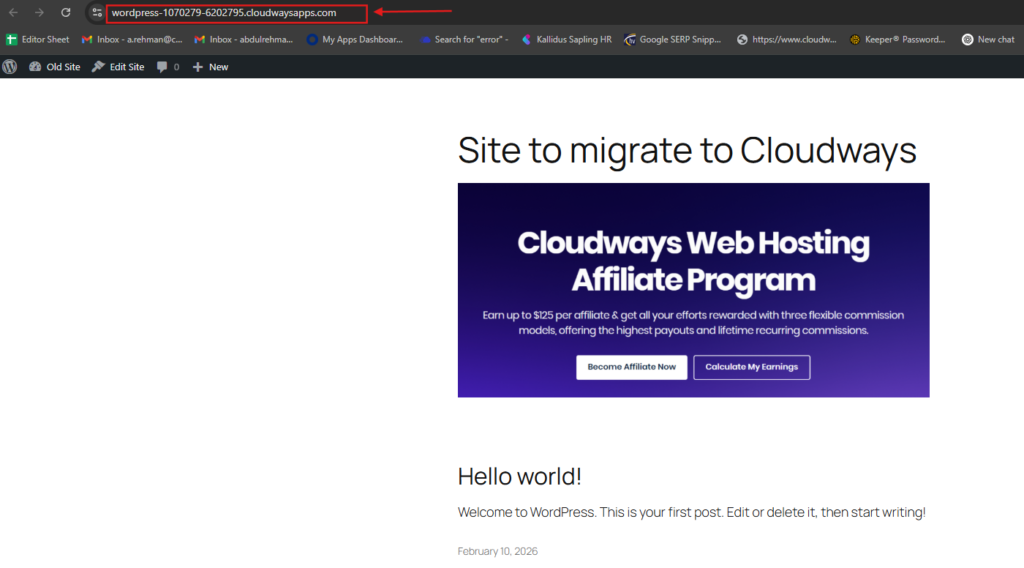
Many agencies end up having to migrate existing projects into Cloudways.
Luckily, the process is generally pretty smooth, especially compared to doing it on AWS or Google Cloud.
Cloudways offers a variety of migration tools that allow to migrate WordPress websites effortlessly.
This helps to reduce the risks and project costs when dealing with multiple clients.
Development Considerations
If you run a development-heavy agency, you’ll be pleased to hear that Cloudways supports many modern development practices:
Hosting staging instances
- Git deployment
- SSH access
- SFTP access
- PHP version switching
- Cron job management
These tools allow developers to work in isolation before deploying the website to the production server.
This ultimately leads to faster development cycles and fewer bugs in production.
Handling Increased Traffic
Marketing campaigns have a certain risk of failing, which ultimately impacts the traffic of the targeted website.
Some common examples include:
- Black Friday sales
- Product launches
- Viral social media posts
- Positive publicity
- Newsletter spam campaigns
In most cases, it is much easier to scale up a single server than to move to another hosting provider.
Cloudways allows to scale the server vertically to handle increased traffic.
This dramatically reduces the risks and project costs.
Website Security: Are there Enough Features for Agencies?
As agencies grow, more and more websites need to be hosted.
With increased complexity comes increased risk, which makes security a very important consideration.
Let’s take a closer look at the built-in security features and optional additions.
Security Features Included with All Plans
- Free SSL certificates
- Dedicated firewall
- IP allowlisting
- Automated backups
- Two-factor authentication
- Bot protection
These features provide a good baseline for most agencies.
However, some high-level security features are only available as paid add-ons.
Additional Security Features (Available as Add-ons)
- Malware protection
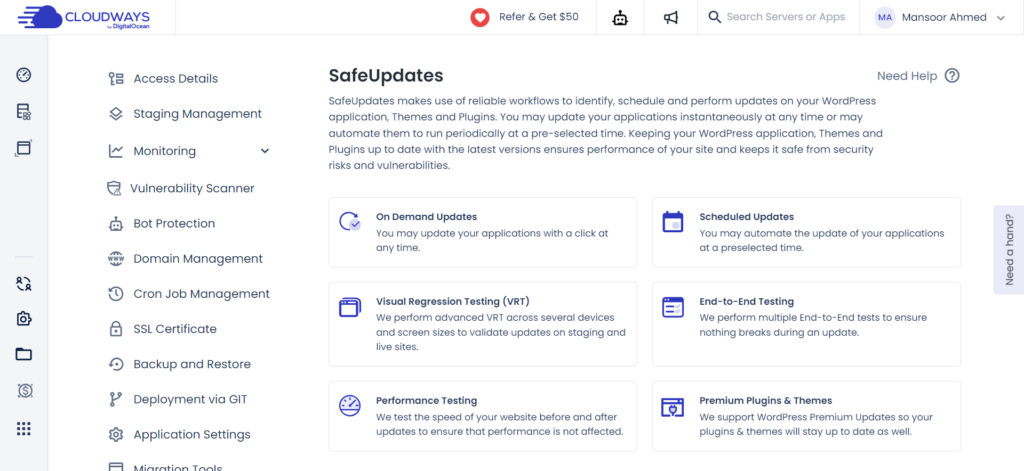
- SafeUpdates
- Premium CDN
These additional features can be crucial for agencies that need to provide extra security guarantees for their clients.
I personally believe that most agencies should utilize the included bot protection and web application firewall to help prevent attacks on their websites.
However, extra security features come with additional costs.
This becomes especially important for agencies that host dozens of WordPress websites – the more websites you have, the higher the expenses will be.
In this regard, it is worth comparing Cloudways to other providers that offer more built-in security features.
Expert Tip
Cloudways provides good foundational security, but agencies should evaluate additional features and costs before committing to large-scale deployments.
Ease of Use
The majority of cloud-based solutions are typically quite complex.
In most cases, technical expertise is required to configure and maintain a cloud-based infrastructure.
Cloudways attempts to balance flexibility and ease of use, and succeeds at doing so.
The platform is generally easy to navigate, with the most common tasks only requiring minimal technical knowledge.
The dashboard is separated into discrete sections:
- Servers
- Applications
- Projects
- Team management
- Monitoring
- Backups
It is also possible to launch most common tasks without utilizing the terminal or the command line.
How Much Technical Knowledge is Required?
Compared to using raw cloud resources, anyone can get started with Cloudways without any technical knowledge.
However, it is important to understand the general concepts of:
- Servers
- Applications
- Storage
- Scaling
- DNS
- Resource allocation
Fortunately, most of these concepts are explained in great detail in the documentation.
Agency Support: Does Cloudways Support Agencies?
Many agencies provide website hosting services for their clients.
In this regard, support options become critically important.
After all, most agencies do not want to spend time troubleshooting technical issues when a client’s WordPress website is down and they are unable to provide services.
Cloudways offers a variety of support options, namely:
- Live chat
- Ticket support
- Knowledge base
- Community forum
I find that the technical support is generally good, but it is important to understand that Cloudways does not provide concierge-level support for agencies. You are encouraged to consult the documentation and community forum before contacting support.
In short, Cloudways support team is knowledgeable, but agencies should be aware that technical support only extends to server-level issues.
If you need advice on optimizing your WordPress instance or assistance with third-party plugins, these are beyond the support scope.
Cloudways review 2026: Pros and Cons
Let’s summarize everything that has been said in this guide with a list of pros and cons.
Pros
- Exceptional performance
- Flexible cloud provider selection
- Easy server scaling
- Good agency-specific features
- Ability to host multiple applications
- Good staging environment
- Developer-friendly features
- Infrastructure-level pricing
Cons
- Steeper learning curve
- Additional security features require extra spending
- No email hosting included
- Server resource planning is your responsibility
- Larger cloud providers become prohibitively expensive
Cloudways vs Kinsta Comparison
Both Cloudways and Kinsta are designed to offer managed WordPress hosting, but there are significant differences between the two.
Cloudways vs Kinsta
| Feature | Cloudways | Kinsta |
|---|---|---|
| Infrastructure | Multiple cloud providers | Google Cloud only |
| Website Limits | Resource based | Plan based |
| Server Flexibility | High | Moderate |
| Developer Controls | Extensive | Good |
| Ease of Use | Good | Excellent |
| Pricing Model | Pay for infrastructure | Pay per plan |
Color guide: Green = Advantage · Purple = Good · Amber = Moderate
Which Is Better?
Choose Cloudways if:
- You manage hundreds of client websites.
- You require a lot of flexibility.
- You need to setup your own server configuration.
- You need to save on costs.
Choose Kinsta if:
- You want everything to be simple.
- You always wanted managed hosting.
- You need enterprise level support.
Cloudways vs WP Engine
WP Engine has been one of the most established managed WordPress hosting providers for years.
Its main advantages were enterprise-grade support, security, and WordPress optimization.
Meanwhile, Cloudways focuses on flexibility.
Cloudways vs WP Engine
| Feature | Cloudways | WP Engine |
|---|---|---|
| Infrastructure Choice | Yes | No |
| Multi-site Flexibility | Excellent | Good |
| Developer Features | Excellent | Very Good |
| Enterprise Support | Good | Excellent |
| Pricing Flexibility | Excellent | Moderate |
Color guide: Green = Advantage · Purple = Good · Amber = Moderate
As such, agencies that want to offer the most flexibility should go with Cloudways. Meanwhile, organizations that require full-service support are better off with WP Engine.
Cloudways vs SiteGround
SiteGround is one of the most popular hosting providers for small businesses and beginner users.
However, the two companies are rather different, as Cloudways is more geared toward agencies and developers.
Cloudways vs SiteGround
| Feature | Cloudways | SiteGround |
|---|---|---|
| Managed Cloud | Yes | Limited |
| Scalability | Excellent | Good |
| Server Control | High | Moderate |
| Developer Tools | Excellent | Good |
| Performance Flexibility | Excellent | Moderate |
Color guide: Green = Advantage · Purple = Good · Amber = Moderate
To sum up, SiteGround is great for smaller operations and less experienced users. Whereas Cloudways is the better choice once you have multiple projects and need more control and flexibility.
Mid-Article Expert Tip
When it comes to choosing the best hosting plan for your agency, one of the biggest mistakes that agencies make is to prioritize the billed amount per month.
In most cases, it makes more sense to analyze the entire budget that goes into the project and consider not only the billed amount but server management, scalability, downtimes, migrations, additional features, and much more. In many cases, a slightly more expensive option will allow you to reduce the overall expenditure.
Need help getting ranked higher on both Google and AI search engines? Fast hosting is only one part of the puzzle. Digehub’s SEO Services, Content Marketing Services, and AI Visibility Services can help you take advantage of technical and content-related optimizations to make your website discoverable by both Google and AI search APIs.
Book a free discovery call to learn more about our strategy to help your website appear in search results and grow exponentially in traffic and sales.
Which Type of Agency Should Choose Cloudways?
There are many types of agencies and not all of them are the same. A single freelance developer who maintains a few WordPress sites for small businesses has different needs than an enterprise-level organization that develops large websites and web applications for major companies.
Having reviewed the features and benefits of Cloudways, let’s take a look at the different types of agencies and businesses that can benefit from using the platform.
Freelance WordPress Developers
Verdict: ⭐⭐⭐⭐⭐ (Excellent Choice)
If you’re a freelance WordPress developer who manages around 5-20 sites for clients, Cloudways can be a great fit.
Using a single Cloudways plan, you can host multiple client sites and scale individual servers as needed instead of having to purchase separate hosting plans for every site.
The main benefits in this case include reduced cost and the ability to manage everything from a single location.
There’s also a significant amount of flexibility, as you can utilize many of the available optimizations and tools.
The only potential downside is that you’ll need to have a basic understanding of how hosting works and how different WordPress sites hosted on the same server can affect one another.
Small Digital Marketing Agencies
Verdict: ⭐⭐⭐⭐⭐ (Highly Recommended)
Small digital marketing agencies are, in many ways, the perfect fit for Cloudways.
Most such agencies have a varied workload that involves managing several different WordPress sites, landing pages, blogs, and WooCommerce stores, as well as working with clients on various SEO and digital marketing tasks.
In most cases, such agencies have greater flexibility and can choose between different types of clients and project sizes.
In this scenario, Cloudways provides the ability to organize projects efficiently, manage multiple applications, and utilize collaboration tools while reducing overall costs. All the key features such as team collaboration, organization, server monitoring, and resource management are available right within the Cloudways dashboard.
If one agency has more projects during certain months and fewer during others, such a workload pattern can be much easier to manage with Cloudways.
Web Development Agencies
Verdict: ⭐⭐⭐⭐⭐ (Excellent Choice)
Most web development agencies tend to prioritize flexibility and performance.
In many ways, Cloudways was designed with such agencies in mind.
The platform provides a number of useful features and tools that allow developers to deploy applications faster and manage multiple projects with greater ease.
The most notable features include Git deployment, SSH and SFTP access, PHP version manager, staging environments, and cron job manager, among others.
As such, Cloudways can be a great fit whenever an agency needs to create and maintain a large number of custom WordPress sites, Laravel applications, or WooCommerce stores.
Large Agencies and Enterprises
Verdict: ⭐⭐⭐⭐☆ (Very Good)
While Cloudways can certainly work for large agencies and enterprises, such organizations will likely have to put in more effort to get the most out of the platform.
When it comes to very large organizations, most of the discussed benefits of Cloudways are less relevant. At this level, most agencies will have dedicated teams that handle different aspects of website development, management, and maintenance.
As such, the ability to host multiple applications on the same server and organize things into projects will bring more benefits in such a scenario.
Nevertheless, there are also some considerations to keep in mind. At the enterprise level, many organizations begin to rely on more specialized solutions.
For large agencies, enterprise-level managed WordPress hosting can be a better option in some cases due to the increased level of support and reliability.
Cloudways provides the necessary tools and options but may not be the best fit for every single enterprise scenario.
Who Shouldn’t Choose Cloudways?
While many organizations and developers can benefit from using Cloudways, there are also some scenarios in which it may not be the best fit.
As a rule of thumb, you should consider looking elsewhere if you’re
- looking for the absolute simplest solution,
- don’t want to deal with any technical aspects
- need additional features such as email hosting,
- only maintain a single small website, and/or
- prefer a fully managed solution.
For such users, many other hosting providers offer a much more streamlined experience.
Cloudways is designed to give you more flexibility, so it’s best suited for people and organizations that are willing to invest the time and effort in order to get the most out of the platform.
AI Is Coming For Hosting As We Know It
Traditionally, the focus of any website and app was on speed, performance, and reliability. While these factors are still important, they are no longer sufficient. Artificial intelligence (AI) is quickly becoming a major force in the world of online marketing and is already changing the way websites are developed, optimized, and hosted.
More and more companies are realizing that in order to stay competitive, they need to embrace AI and prepare their websites accordingly. The main factors that will determine how search engines and AI assistants treat a given domain are performance, uptime, API access, security, and overall stability.
As such, any modern website, and especially any modern business, needs to have hosting that supports its ability to perform on both traditional search engines and emerging AI-driven discovery platforms.
Why Fast Hosting Matters For AI Visibility
Many AI-driven search tools and assistants already rely on traditional search engines as a discovery mechanism. While the technology behind such systems is still rather limited, the trends suggest that in just a few years, major search engines will begin utilizing AI to a much greater extent.
Some experts predict that within a decade, Google will transition to a fully AI-driven search algorithm. As such, the ability for a website to be discovered and indexed by AI-driven crawlers and spiders will become much more important.
The main consideration when it comes to AI discovery is speed. AI systems will always favor websites that load faster and offer a better experience. With that said, it’s important to understand that fast hosting is only one part of a much bigger puzzle. Hosting is important, but it should not be prioritized over other crucial factors such as content, optimization, and structured data.
In terms of actual technical requirements, a website powered by a reliable and fast hosting solution will benefit from faster crawl rates and more frequent indexing, which means that Google will update its information about the website more often. Additionally, a well-hosted website will have better performance and offer a better user experience, both of which are critical elements of modern SEO.
A reliable and fast hosting solution can make a real difference when it comes to both traditional SEO and AI SEO. However, a company will not benefit from faster speeds and more frequent indexing if the website’s content is weak and unoptimized.
In order to truly maximize rankings and visibility, you should always prioritize content over technical factors.
Many businesses make the mistake of investing heavily into fast and reliable hosting while neglecting the basics of SEO. High-end hosting alone will rarely result in significant improvements in rankings or increased organic traffic. Instead, you should focus on finding the right balance between technical requirements and content creation and optimization. Hosting is the foundation, but great content is what will ultimately improve your rankings and help you appear in Google’s search results as well as AI search APIs.
If you want to appear in search results and benefit from both traditional SEO and AI SEO, you need to ensure that your website is both technically sound and optimized correctly. Hosting will form the basis of your optimization efforts but will not be enough on its own.
At Digehub, we assist businesses with both technical and content-related aspects of SEO. If you need help improving your rankings on Google, Bing, ChatGPT, and other search engines, feel free to contact us and request a free SEO consultation. We’ll carefully review your website and make specific recommendations for improvements.
Common Mistakes When Choosing Cloud Hosting
Throughout the years, we’ve seen numerous businesses make the same mistakes when choosing or switching between cloud hosting providers. Let’s go over some of the most common mistakes.
Focusing Too Much on Cost
As mentioned above, when selecting a cloud hosting provider, cost should not be the deciding factor. Cheap hosting is rarely a good choice, as you will often have to pay extra for additional features and options.
Instead, you should analyze the total expenditure associated with a given provider. Even though the billed amount per month may be low, slow performance can hurt sales, cause issues with customer retention, and require extra expenditures on support and maintenance.
Not Thinking About The Future
Many businesses underestimate the potential future growth of their websites and online stores and choose a hosting plan that is too small for their future needs. As a result, they either waste money on a plan that is too large or have to renew their contracts on less favorable terms. It’s important to choose a plan that will accommodate future traffic increases and/or additional projects.
When it comes to Cloudways, this is much less of an issue, as the platform allows you to scale effortlessly whenever you need additional resources.
Hosting All Your Projects On A Single Server
As you’ve already learned, Cloudways allows you to host multiple websites on a single server. However, it’s important to note that this is only beneficial if the websites have similar traffic, performance, and optimization needs.
If you have multiple client sites that you host on Cloudways, it’s a good idea to place them on separate servers if one of the websites is significantly larger than the others. That way, you’ll be able to ensure that large traffic spikes on a single domain do not affect the performance of other domains.
Not Paying Enough Attention To Security
Many agencies and developers assume that a good hosting provider should take care of all aspects of security.
In reality, website security always depends on a combination of different hosting-related and non-hosting-related factors.
You should always analyze the security aspects of a given provider, but it’s also important to remember that there is no provider that will cover every single possible vulnerability.
Not Optimizing Your Website/App
Fast hosting can only take you so far. Regardless of the hosting provider you choose, it’s important to optimize your website or application in order to get the best possible performance out of your server. Hosting optimization is a complex topic that involves a number of different factors.
Some of the most important optimization steps include choosing an efficient theme, reducing the number of plugins, optimizing images, utilizing caching, and minimizing the use of external resources.
Expert Insights
Having worked with multiple web hosting providers, I realized that the decision is rarely based on speed. Instead, the choice depends on the balance between operational efficiency and performance for the end-users.
When we look at the common decision-making factors for agencies, they are usually focused on either benchmark scores or month-to-month costs. However, I have yet to meet an agency manager who would base the selection on the critical production efficiency features.
For example, when the team needs to scale more sites or redesign existing ones faster and easier, the ability to use staging areas, vertical scaling, built-in backups, and multi-project management becomes more valuable than minor differences in server performance.
The same goes for agencies with 20+ websites hosted – the choice between Cloudways and any other managed WordPress hosting provider is dictated by users’ demand for infrastructure-based billing. In other words, the ability to sort active projects between several servers according to traffic, importance, and performance needs helps agencies scale faster and better organize their resources.
The most notable advantage of Cloudways is the flexibility and choice when it comes to underlying infrastructure.
Unlike other managed cloud hosting services, which restrict users to their proprietary ecosystem, Cloudways offers an option to build websites on DigitalOcean, Vultr, AWS, or Google Cloud. That way, agencies can distribute their projects between different infrastructures more efficiently.
I see this as a major advantage, especially for larger agencies, which host dozens of websites with varying demands for resources and performance.
On the other hand, I believe that Cloudways could benefit from more security-focused features. For instance, I would have preferred malware scanning and safe update options as an integral part of the plan instead of an add-on. Agencies that manage multiple WordPress sites for their clients would find this feature invaluable.
Moreover, I have seen many users debate the question on Reddit, Quora, and in various WordPress hosting forums. They ask whether it makes more sense to go with a direct VPS management or rely on a third-party provider like Cloudways.
To my mind, this decision should depend on whether there is an experienced Linux administrator within the team’s staff. If yes, there is little point in overpaying for another layer of infrastructure management. On the other hand, most agencies and website owners realize that the extra expense is worth the time and effort required to maintain VPS server(s).
Overall, I believe that it is unwise to focus too closely on performance and pricing. In most cases, these factors are irrelevant from the user’s perspective. Instead, agencies should prioritize production efficiency when choosing between Cloudways and similar managed cloud hosting services.
With this guide in mind, it becomes clearer why Cloudways is one of the best options for agencies in 2026. Its combination of flexibility, performance, and infrastructure-based management helps organizations scale websites without compromising on quality hosting.
Future Outlook: Is Cloudways Ready For The Next Big Thing?
The next big thing in hosting is still unclear, but it is safe to assume that the next few years will bring significant changes. Companies are already investing heavily into automation, artificial intelligence, edge computing, and other emerging technologies.
As such, in a few years, there will be a number of fundamentally different hosting options that will offer much more functionality and flexibility. In particular, many hosting providers are expected to introduce features that will streamline server administration and website maintenance.
As such, agencies will need to be prepared to adopt these new technologies in order to maximize their efficiency and provide the best possible experience for their clients.
At this point, it is impossible to say exactly which of the three providers will dominate the market in several years. However, from our expert point of view, companies such as Cloudways offer excellent value and flexibility, which should enable them to stay in the lead for the foreseeable future.
For agencies that want to invest in long-term growth and do not want to be left behind, Cloudways represents a safe choice for now and in the near future.
Great hosting is only one part of sustainable online growth. To maximize the value of platforms like Cloudways, businesses should pair reliable infrastructure with a robust SEO strategy, high-quality content, and AI-ready optimization. At Digehub, we help brands build that complete ecosystem through SEO Services, Content Marketing Services, and AI Visibility Services, enabling websites to perform well in both traditional search and emerging AI-driven discovery.
Frequently Asked Questions
Not necessarily. Because Cloudways runs on standard cloud infrastructure and supports common technologies like WordPress, PHP, MySQL, SSH, and Git, migrating is generally more straightforward than leaving highly proprietary hosting platforms. The biggest challenges are usually DNS changes, email configuration, and minimizing downtime rather than the platform itself.
For most agencies, DigitalOcean and Vultr High Frequency deliver the strongest value. AWS and Google Cloud offer greater enterprise capabilities and global infrastructure but often come with higher costs. The ideal choice depends on your workload, geographic audience, compliance requirements, and expected traffic patterns.
For most businesses, the built-in firewall, free SSL, IP allowlisting, automated backups, and managed server updates provide a strong baseline. However, agencies handling sensitive client data should also implement a Web Application Firewall (WAF), malware scanning, strong authentication, routine vulnerability management, and regular off-site backups. Hosting security should be viewed as one layer of a broader security strategy.
Generally, no. A better practice is to separate websites by traffic levels, business criticality, and resource consumption. This reduces performance interference, simplifies maintenance windows, and limits the impact if one website experiences unexpected traffic spikes or technical issues.
Not quite. Cloudways provides strong platform-level support and generally resolves server-related issues efficiently. However, it expects users to handle application-specific optimization. Kinsta and WP Engine typically provide more hands-on WordPress expertise, which is reflected in their higher pricing.
It can. While infrastructure-based pricing is often more economical than paying per website, optional services such as premium CDN, malware protection, email hosting, and SafeUpdates can increase total costs. Agencies should calculate total ownership cost rather than comparing only the base server price.
Yes, provided the server is properly sized. WooCommerce generates frequent database writes, so choosing faster infrastructure, enabling Redis, optimizing queries, and leaving sufficient CPU and RAM headroom is essential. Simply upgrading to a larger server without optimizing the application rarely delivers proportional performance gains.
Cloudways provides an excellent performance foundation through SSD infrastructure, Redis, Varnish, Nginx, and optimized server stacks. However, Core Web Vitals still depend heavily on your theme, plugins, images, JavaScript, fonts, and overall front-end optimization. Hosting alone won’t fix poor website architecture.
There is no fixed limit. It depends on RAM, CPU, traffic, WooCommerce usage, caching, and plugin quality. An optimized 4 GB server may comfortably host dozens of low-traffic brochure sites, while a few busy WooCommerce stores could require dedicated resources. Resource usage matters far more than website count.
For most agencies, yes. The premium covers server provisioning, security patches, backups, monitoring, staging, SSL management, scaling, and support. If you’re comfortable managing Linux servers, firewalls, and backups yourself, a raw VPS will be cheaper. Otherwise, Cloudways often saves far more in operational time than it costs.
Final Verdict
Having analyzed Cloudways from the perspective of an average agency, it’s time to discuss our overall verdict.
Cloudways hosting is one of the best managed cloud solutions on the market at the moment. It provides agencies with excellent flexibility, performance, and value for money.
In our honest opinion, Cloudways does not have a real competitor in 2026 that would offer similar value and flexibility. That being said, there are some providers that are noticeably better in specific areas, such as performance or ease of use.
As a whole, Cloudways is one of the best options for agencies that need to manage multiple projects without spending too much money on separate hosting plans for each project.
Our Overall Rating: 4.8/5
| Category | Rating |
|---|---|
| Performance | ⭐⭐⭐⭐⭐ |
| Ease of Use | ⭐⭐⭐⭐☆ |
| Scalability | ⭐⭐⭐⭐⭐ |
| Security | ⭐⭐⭐⭐☆ |
| Pricing | ⭐⭐⭐⭐☆ |
| Developer Features | ⭐⭐⭐⭐⭐ |
| Agency Workflow | ⭐⭐⭐⭐⭐ |
Overall ⭐⭐⭐⭐⭐ (4.8/5)
Color guide: Green = Excellent · Purple = Good
