
Technical SEO Checklist 2026: How to Do Technical SEO in 2026 (Agency Checklist)
Introduction
Search is undergoing a fundamental transformation in 2026. Ranking in Google is no longer the ultimate goal – companies now want their content to appear in the answers generated by AI models like ChatGPT, Perplexity, Gemini, and Google’s own AI search tools. This shift has made technical SEO more important than ever.
We often see companies with thousands of articles struggling to rank because of technical SEO issues. Websites with impeccable content but poor technical SEO foundations fail to deliver on their organic potential. Technical SEO problems prevent Google from crawling, reading, and ranking your content.
In this guide, we’ll provide a technical SEO checklist that will help agencies, SaaS, enterprise websites, marketers, and small businesses to optimize their websites for the modern search landscape. Unlike generic technical SEO checklists, we will also focus on technical SEO practices that make websites more accessible to AI search.
Whether you want to perform a technical SEO audit for the first time or optimize your enterprise-level technical SEO operations for scale, this guide will help you prioritize tasks that make the most difference.
Quick Answer
Technical SEO in 2026 refers to the set of practices that help search engines and AI crawl, read, index, and trust your website’s content.
A technical SEO checklist should include:
- Technical SEO audit for crawlability
- Indexability optimization
- Core Web Vitals
- Website architecture
- Internal linking
- URL structure
- Schema markup
- JavaScript rendering
- Website security
- Technical SEO monitoring
Modern technical SEO practices also make websites more attractive to AI search.
Why Technical SEO Is Important in 2026
Most marketers incorrectly assume that technical SEO is all about fixing Google Search Console errors. In reality, technical SEO touches on all aspects of how search engines and AI discover, parse, index, and rank webpages.
Better crawl budget
Search engines have limited resources to crawl websites. Technical SEO helps you maximize crawl budget by eliminating unnecessary redirects, duplicate pages, orphaned pages, and inefficient internal linking.
For enterprise websites, crawl budget optimization is critical. Otherwise, new pages may not get discovered for months.
Better indexation
Publishing a page is not enough – Google has to index the page before it appears in search results.
Many websites have hundreds or even thousands of articles with indexing issues. Ahrefs has seen indexing problems on enterprise websites where 30% or more of the pages were not indexed due to technical issues. Fixing indexation problems usually has a faster SEO impact than optimizing new content.
Better user experience
Google rewards websites that deliver excellent UX. Technical SEO practices such as faster page speeds, mobile responsiveness, efficient caching, optimized images, and better layout contribute to a better user experience and higher conversion rates.
Better AI visibility
AI search engines are fundamentally different from traditional search engines. They prioritize websites that use clean website architecture, header markup, structured data, and better internal linking. Technical SEO helps such websites to be discovered and digested by AI more efficiently.
Higher ROI across marketing channels
Ahrefs has seen technical SEO improvements lead to higher Google Ads Quality Scores, better landing page performance, higher conversion rates, and better crawlability. Technical SEO has a positive impact on all areas of marketing, not just organic search.
Most technical SEO guides are written from the perspective of a single website. However, agencies that provide technical SEO services for multiple clients should think about technical SEO optimization at a process level. There are technical SEO tasks that should always be prioritized over others.
We recommend that technical SEO agencies adopt a four-priority system as follows:
| Priority | Impact | Example |
|---|---|---|
| Critical | Prevents crawling/indexing | Robots.txt issues |
| High | Strong ranking influence | Core Web Vitals, internal linking issues |
| Medium | Supports long-term growth | Schema markup |
| Low | Minor improvements | HTML validation issues |
This prioritization helps agencies to focus on technical SEO fixes that actually make a difference to their clients’ business.
Technical SEO Checklist Part 1: Crawlability
If search engines cannot crawl your website, there is little point in optimizing for anything else. This is why technical SEO crawlability should be the first priority.
1. Audit robots.txt
Robots.txt is a file that tells search engines what pages on your website are allowed/crawled and what are disallowed/not crawled.
Ahrefs has seen websites with hundreds of disallowed URLs in robots.txt, which prevented them from ranking in Google.
When reviewing your robots.txt, you should pay special attention to:
- Disallow directives
- Sitemap location
- Testing environment directives
- Blocked resources
- JavaScript files
- CSS files
Ahrefs has seen many instances of staging directives being accidentally pushed to production, thereby blocking search engines from crawling the website.
2. Submit sitemaps
Sitemaps help search engines to discover your website’s pages. While submitting a sitemap does not guarantee indexing, it significantly improves the discoverability of your content.
Your sitemap should have:
- Only indexable URLs
- No redirects
- No 404 pages
- Updated URLs
- Canonical URLs
For enterprise websites with thousands of pages, it makes sense to break the sitemap into multiple files, for example, blog, products, categories, videos, and images. This helps in managing the sitemap within Google Search Console.
3. Remove crawl traps
Crawl traps are URLs that waste a search engine’s crawl budget. They should be removed or limited.
Common crawl traps include:
- Infinite URL parameters
- Calendar pages
- Faceted navigation
- Duplicate category filters
- Session IDs
- Search result pages
4. Fix internal linking issues
Internal linking issues are a significant ranking factor. They waste crawl budget, reduce the link equity of your pages, and make your website less user-friendly.
During technical SEO audits, we often find hundreds of broken internal links, such as:
- 404 links
- Redirect chains
- Redirect loops
- Broken images
- Missing PDF files
- Deleted landing pages
5. Optimize crawl budget
Crawl budget is a prioritization system used by search engines to decide which pages to crawl more frequently. It is especially relevant for websites with thousands of pages.
You can optimize your crawl budget by:
- Removing thin pages
- Removing duplicate pages
- Updating old pages
- Improving internal linking
- Removing redirects where possible
- Using clean URLs
Think of crawl budget as a team of people. The more obstacles you throw in front of them, the slower they will be at getting their work done.
Technical SEO Checklist Part 2: Indexability
Just because a webpage is crawlable does not mean it will be indexed. Indexability refers to the ability of a webpage to be indexed by search engines.
6. Find non-indexed pages
Use Google Search Console to find non-indexed pages. Non-indexed pages fall under the following categories:
- Crawled, currently not indexed
- Discovered, currently not indexed
- Duplicate without user-selected canonical
- Alternate page with canonical tag
- Soft 404
Each of these categories provides valuable insight into why a page has not been indexed.
A high number of non-indexed pages usually indicates underlying technical SEO issues.
7. Check canonical tags
Canonical tags help search engines identify the original source of content. They should be used to avoid duplicate content issues.
When checking canonical tags, you should ensure that:
- All indexable pages have a self-referencing canonical
- The canonical URL returns a 200 OK status
- The canonical URL is not redirected or does not return a 404
- Pagination URLs and filtered URLs use canonical tags correctly
- HTML and HTTP headers do not have conflicting canonical URLs
Incorrect canonical tags are one of the most common technical SEO issues, especially on SaaS and e-commerce websites.
8. Check meta robots directives
Before publishing or updating any page, make sure that it is not blocked by any robots directives.
Most technical SEO issues we see are caused by noindex,nofollow, and X-Robots-Tag directives. It is not uncommon for us to see development directives accidentally pushed to production, thereby blocking important pages from appearing in Google.
Expert Insight
One of the technical SEO trends we have noticed in the last year is that successful websites are embedding technical SEO into their monthly operations. This includes technical SEO monitoring and optimization of crawlability/indexing issues. In our experience, this approach helps to maximize the impact of technical SEO while also helping to maintain the discoverability of the website in both traditional and AI search.
Technical SEO Checklist Part 3: Website Architecture
A technically sound website begins with a strong architecture. Search engines do not randomly stumble upon web pages. They follow links and understand the relationship between them. If your architecture suffers, even the best content pages fail to achieve their goals.
One significant difference we see between websites that perform reasonably and websites that dominate their niche is not necessarily the content quality. It is often the organization and connection of existing content.
9. Create a Flat Website Architecture
A flat website architecture is one where all the critical pages are no more than 3-4 clicks away from the homepage. Ideally, your website should look something like this:
Home
├── Services
│   ├── SEO Services
│   ├── AI Visibility
│   └── Content Marketing
├── Blog
│   ├── Technical SEO
│   ├── Local SEO
│   └── AI Search
└── Contact
And not like this:
Some sites mistakenly bury important pages six or deeper clicks away from the homepage. The deeper something is, the more challenging it is for search engines to find and index.
Best practices
- Try to keep everything within 3-4 clicks from the homepage
- Use descriptive naming for your top-level navigation
- Cluster articles around topics
- Avoid unnecessary subfolders for your content articles
- Periodically audit your orphan pages
10. Build Internal Linking Between Related Resources
Internal linking tells search engines which resources are the most valuable on your site. Counterintuitively, many websites ignore internal linking altogether or perform it at a bare minimum.
Any page featuring substantial content must have internal links pointing to related resources. When writing about technical SEO, for example, relevant internal links might point to
- SEO audits
- Core Web Vitals
- structured data
- AI visibility,
- and other topic-related resources.
Avoid using vague anchors such as click here and instead use descriptive anchors, such as technical SEO audit checklist or improve Core Web Vitals.
Contextual internal links with descriptive anchors provide additional SEO value to your linked resources.
Pro tip
When auditing enterprise-level websites, I routinely find hundreds of high-quality resources that remain underutilized simply because they lack internal links. In many cases, improving existing internal linking strategies can yield significantly better results than creating new content.
11. Audit Orphan Pages
An orphan page is a page that lacks internal links pointing to it. Even if the page is in your sitemap, it will remain relatively inaccessible to search engines.
I recommend periodically auditing all of your website’s pages for orphans, including
- old blog posts
- landing pages
- various campaigns
- resource pages,
- case studies,
- etc.
Each of these pages should have at least one internal link pointing to it. Now, let’s proceed to another critical aspect of technical SEO.
Technical SEO Checklist Part 4: URL Structure
Website URLs are often overlooked, but they can profoundly impact your ability to organize, prioritize, and promote your content.
They also play a critical role in building trust with your audience. Here is an example of a good URL:
example.com/technical-seo-checklist
And here is an example of a bad one:
example.com/post?id=49384&page=8&type=seo
12. Keep URLs Simple
Ensure your URLs are short and descriptive. Use lowercase letters and hyphens, not underscores. Whenever possible, make your URLs contain primary keywords. Avoid having too many query parameters in your URLs. You should be very careful when renaming URLs because search engines may fail to recognize the new URLs.
13. Audit Redirects
Redirects are necessary, but having too many breaks up the crawl budget. I recommend periodically auditing your website to ensure that
- redirect chains are kept to a minimum
- there are no redirect loops
- 302 redirects do not become 301 redirects
- and
- redirects ultimately lead to relevant pages.
A page should redirect at most once before reaching the desired destination.
Technical SEO Checklist Part 5: Core Web Vitals
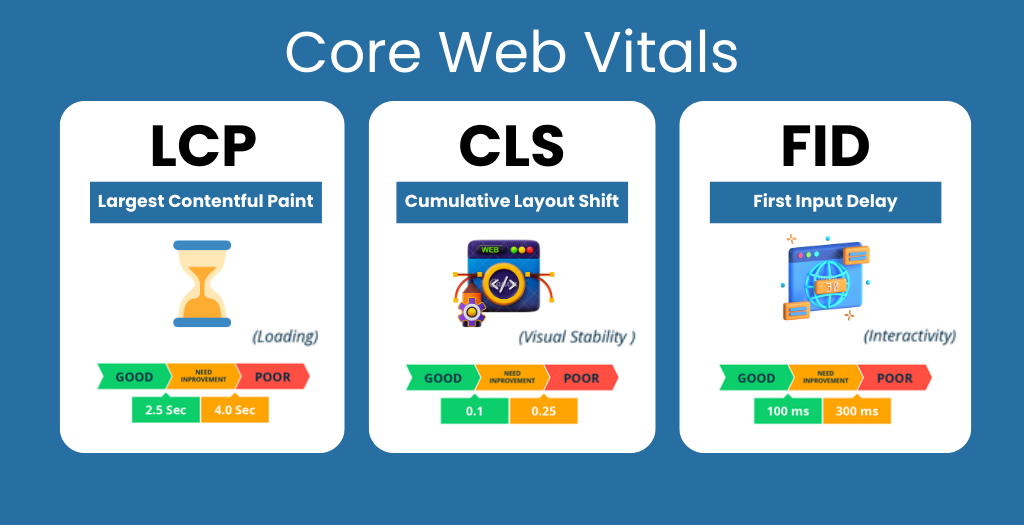
Core Web Vitals continue to be one of the most critical technical quality signals in 2026. While Google considers a vast number of ranking factors, there is no doubt that user experience remains at the center of its operations. There are three Core Web Vitals, each of which measures a different metric.
| Metric | Measures | Goal |
|---|---|---|
| Largest Contentful Paint (LCP) | Loading speed of a page | Under 2.5 seconds |
| Interaction to Next Paint (INP) | Responsiveness of a page | Under 200 milliseconds |
| Cumulative Layout Shift (CLS) | Visual stability of a page | Under 0.1 |
14. Largest Contentful Paint (LCP) Optimization
Large images are frequently the culprit behind a poor LCP score. The most typical optimizations involve reducing the image size, adopting next-gen image formats, eliminating render-blocking resources, optimizing the server response time, enabling HTTP caching, deploying a CDN, and similar techniques. Businesses often overlook how website images contribute to their overall performance. It is not uncommon to encounter companies that spend thousands on website design but neglect basic optimization techniques such as reducing image file sizes.
15. Interaction to Next Paint (INP) Optimization
Google announced that it would replace the First Input Delay with the Interaction to Next Paint (INP). INP reflects how quickly a website responds to a user’s inputs. It builds upon the legacy of the First Input Delay but encompasses a broader spectrum of interactions.
You can optimize INP by
- reducing the amount of JavaScript
- eliminating unnecessary JS code
- deferring non-critical JS
- optimizing event handlers
- breaking up long JS tasks
Too many JS frameworks and libraries can add substantially to your INP, negatively affecting both your SEO and UX.
16. Cumulative Layout Shift (CLS) Optimization
Users do not enjoy visiting websites where elements randomly jump around the page. Layout shifts generally occur due to
- a lack of image dimensions
- ad scripts
- embedded videos,
- missing placeholders,
- and so on
Whenever possible, always reserve space for elements that may load later to avoid disrupting the overall page layout. With that, let’s proceed to the next technical SEO audit area.
Technical SEO Checklist Part 6: Mobile Optimization
Google primarily operates in the mobile space, which means it prioritizes the mobile version of your website. If your mobile offering is subpar in any way, your rankings will inevitably suffer. You should double-check how your
- website layout
- navigation
- font size,
- tap targets,
- images,
- and overall page speed appear on mobile devices.
The fact that your desktop site looks aesthetically pleasing does not necessarily mean that it is mobile-friendly. You must test your website on several mobile device types and viewports.
Technical SEO Checklist Part 7: JavaScript SEO
JavaScript dominates the modern web, but it also presents certain challenges. While Google can process JS code with relative ease, it is generally better to allow search engines to quickly access the rendered content rather than wait for the JS code to execute.
17. Ensure Critical Content is Rendered
Verify that essential content is visible to search engine crawlers.
- Navigation
- Internal linking structure
- Product descriptions
- Blog articles
- Structured data
may all be rendered correctly and accessible to search engines. If they only appear after the JS code has executed, it will take longer for search engines to process them.
18. Reduce Overall JS Complexity
Any script that runs on your website adds to its complexity, so it is critical to ask yourself if a particular script is worth keeping. For example, you should examine third-party widgets and scripts, analytics code, chatbots, tracking pixels, animation libraries, and anything else that may run on your website. JS bloat affects both search engines and users, so it is critical to remove anything that does not directly contribute to business goals.
19. Leverage Server-Side Or Hybrid Rendering
Server-side rendering often makes more sense for larger platforms that utilize JS-heavy frameworks. It often helps enhance crawlability, performance, indexing speed, and overall user experience.
Large-scale websites using JS frameworks typically benefit from server-side rendering. The decision ultimately depends on the tech stack, but technical SEO considerations should always be part of the equation.
Technical SEO Checklist Part 8: Structured Data and Schema Markup
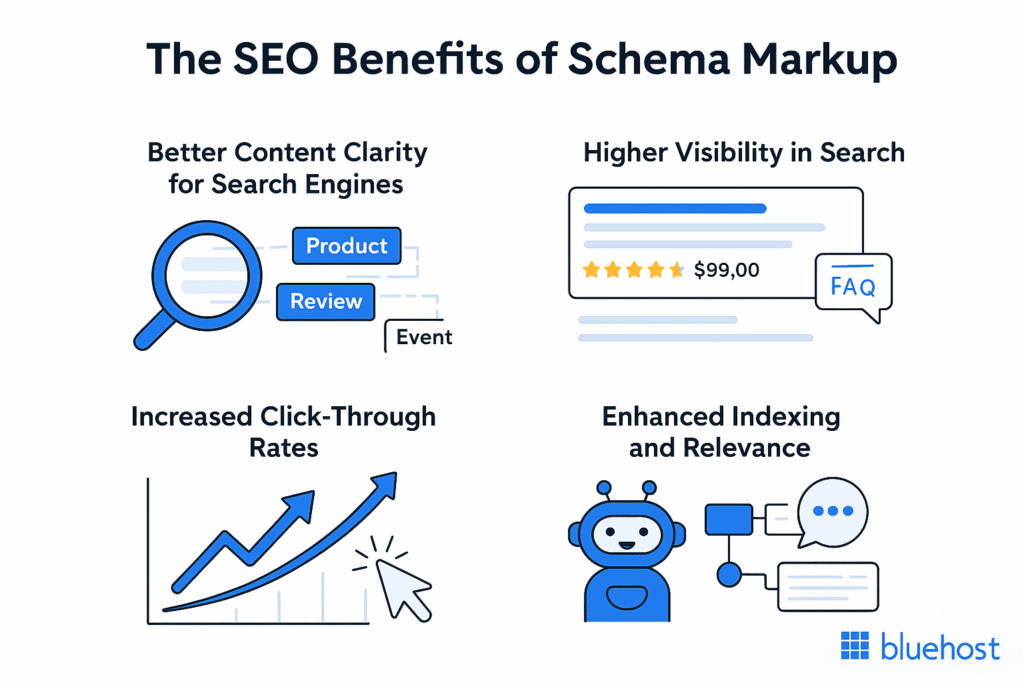
Search engines have become better at understanding content, but structured data remains extremely important. It provides the context for Google and AI to understand what your page is about, who created the content, and how different entities are related.
Schema markup itself is not a ranking factor, but it makes your content more valuable in the eyes of search engines and AI.
20. Implement Relevant Schema Markup
Use schema markup to highlight the most important elements on the page instead of trying to include everything. Some of the most useful schemas are:
- Organization
- WebSite
- Breadcrumb
- Article
- FAQ (for applicable queries)
- Product
- Review
- Service
- LocalBusiness
- Person
Always validate your structured data to ensure there are no errors on your pages. Invalid schema markup will prevent your content from being properly highlighted in search results.
Expert Tip
We often see clients with a ton of irrelevant schema markup on their web pages. Quality always beats quantity when it comes to technical SEO.
21. Maintain Entity Consistency
Modern search engines and AI are much better at using entities to understand what a page is about. Ensure that all elements related to your brand are consistent across your website, schema markup, About page, Contact page, social media profiles, Google Business Profile, and author pages.
Technical SEO Checklist Part 9: Image and Media Optimization
Images are great for engagement, but they can also become a significant technical SEO issue.
22. Optimize All Images
- Compress all images before uploading them to your website.
- Use modern image formats when possible (WebP, AVIF).
- Make sure all images have descriptive file names.
- Add descriptive alt text to all your images.
- Lazy-load all images that are not visible on the first fold.
- Set image width and height to their display sizes.
- Never upload images that are much larger than their display sizes.
23. Optimize All Videos
If your website has videos, optimize them by:
- Embedding them correctly.
- Using video schema markup (when applicable).
- Creating video sitemaps for important videos.
- Avoiding autoplay when possible.
- Compressing your videos when using self-hosting.
Large videos can tremendously slow down your website if not optimized correctly.
Technical SEO Checklist Part 10: HTTPS and Website Security
Website security is no longer an optional bonus. It has become an expectation for both users and search engines.
24. Ensure Proper HTTPS Implementation
Check that:
- All pages are properly secured.
- The HTTP version redirects to HTTPS.
- There is no mixed content.
- SSL certificates are up to date.
- Canonical URLs use HTTPS.
Proper HTTPS implementation is crucial for both users and search engines.
25. Monitor Technical SEO Issues
Always keep an eye on:
- 404 errors.
- 500 errors.
- DNS issues.
- Redirect problems.
- Slow server responses.
Any technical issue can affect crawling, indexing, and even sales.
Technical SEO Checklist Part 11: AI Search Optimization
One of the biggest changes to technical SEO in 2026 is that it now extends far beyond regular search engines. Both ChatGPT, Gemini, Perplexity, and Google’s own AI rely on websites to find information.
In 2026, technical SEO has become one of the most important factors for AI visibility.
26. Make Your Content Easier to Consume by AI
Make your content more accessible to AI by using:
- Clear headings.
- Proper page structure.
- Descriptive anchor links.
- Short paragraphs.
- Consistent language.
- Structured data.
- Entity-based writing.
The easier it is for AI to parse and understand your content, the more likely it is to use your information.
27. Create Strong Topic Clusters
Build your content around topics rather than individual keywords. For example, you can create a content cluster like this:
Technical SEO
Core Web Vitals
Schema Markup
Crawl Budget
JavaScript SEO
AI Visibility
This helps both search engines and AI better understand the context and relationships between your pages.
28. Demonstrate Your Expertise
Technical SEO is no longer just about technical implementation – it also focuses on expertise. Google and other search engines are much better at identifying whether the author truly understands what they are writing about.
Demonstrate your expertise by including:
- Actionable advices
- Fresh insights
- Unique perspectives
- Industry experience
- First-hand knowledge
Whenever possible, use your own data and experience to support what you publish online. This will make your content much more valuable in the eyes of search engines and AI.
Common Technical SEO Mistakes
After reviewing hundreds of websites, here are some of the most common technical SEO mistakes we see.
Avoid the Following SEO Mistakes
- Publishing non-indexable pages
- Blocking important pages in robots.txt
- Using canonical tags incorrectly
- Not optimizing Core Web Vitals
- Leaving redirect chains unresolved
- Creating duplicate content with URL parameters
- Not updating XML sitemaps
- Not optimizing for mobile usability
- Using JavaScript incorrectly
- Treating technical SEO as a one-time task
Small issues add up over time and hurt your organic growth.
Future of Technical SEO Beyond 2026
Technical SEO will continue to evolve in the years ahead. Here are some of the most important trends to watch out for beyond 2026.
AI-Friendly Site Architecture
Relationship-based content will become even more important than keywords. Content clusters, entity-based optimization, and strong internal linking will help AI better understand your content.
Faster Websites
User expectations in terms of performance will continue to grow. Websites will need to become even more optimized to keep up with modern standards.
Structured Knowledge
Entity optimization and structured data will become even more important as search engines and AI rely on them to extract information from websites.
Continuous Technical SEO Audits
Technical SEO will transition from being a one-time task to an ongoing process that requires constant monitoring and optimization.
Businesses that are able to identify and resolve issues faster will be rewarded with better search visibility.
Frequently Asked Questions
Treating technical SEO as a one-time project instead of an ongoing process. Continuous monitoring and regular optimization are essential for maintaining search performance and AI visibility.
A strong toolkit includes Google Search Console, Screaming Frog SEO Spider, PageSpeed Insights, Lighthouse, Chrome DevTools, Sitebulb, Ahrefs or Semrush, Rich Results Test, and DebugBear.
In most cases, yes. Resolving major technical issues first ensures new content can be crawled, indexed, and ranked efficiently, maximizing the return on your content investment.
Technical SEO provides the structure AI systems need to understand and retrieve information. Clean HTML, structured data, logical content hierarchy, and semantic internal linking all improve AI accessibility.
Not inherently. Modern search engines can render JavaScript, but excessive client-side rendering, heavy scripts, or delayed content loading can slow crawling and indexing if not implemented correctly.
Large websites should monitor critical technical issues continuously, perform monthly health checks, and complete a comprehensive technical SEO audit every quarter.
No. Schema markup is not a direct ranking factor, but it helps search engines and AI better understand your content, increasing your eligibility for rich results and improving content interpretation.
The highest-impact issues include crawlability problems, indexing errors, broken internal links, incorrect canonical tags, poor Core Web Vitals, and slow server response times.
Yes. If search engines cannot efficiently crawl, render, or index your pages, even exceptional content may struggle to appear in search results or AI-generated answers.
Technical SEO for AI search focuses on making content easy for large language models to understand through clear site architecture, structured data, entity consistency, and strong internal linking, while traditional SEO places greater emphasis on crawling, indexing, and ranking signals.
Final Agency Checklist
Use this final checklist for every technical SEO audit you perform.
Crawlability
- Robots.txt issues resolved
- XML sitemap submitted
- Internal linking issues resolved
- Crawl traps eliminated
- Crawl budget optimized
Indexability
- Indexing issues resolved
- Canonical issues resolved
- Meta robots issues resolved
- Duplicate content issues resolved
Website Structure
- Flat website structure
- Internal linking optimized
- No orphan pages
- Navigation simplified
Performance
- Core Web Vitals optimized
- Images optimized
- JavaScript optimized
- Caching implemented
- CDN implemented (when needed)
Technical Health
- HTTPS implemented
- Redirect issues resolved
- 404/500 errors resolved
- Mobile usability issues resolved
AI Readiness
- Schema markup implemented
- Entity consistency maintained
- Topic clusters created
- Content hierarchy optimized
- E-E-A-T signals strengthened
This final technical SEO checklist will help you identify and resolve all common technical SEO issues.
Final Thoughts
Technical SEO in 2026 has evolved beyond simple crawlability and indexing. It has become much more involved and multi-faceted. Technical SEO now touches on performance, security, and even AI optimization.
The websites that perform best in 2026 are not the ones with the most content. They are the ones with the best technical SEO, information architecture, and optimization for modern search engines and AI.
Make technical SEO a regular part of your marketing operations. Continuously audit and optimize your technical SEO to ensure that your content remains easily accessible and visible to both search engines and AI.
If you want to optimize your website for search engines and AI in 2026, our SEO Services and AI Visibility Services can help you get started. We offer comprehensive technical SEO audits that will highlight all the issues preventing your website from reaching its full potential.
You can also use our Free SEO Blog Writing Tool to create high-quality, search-friendly content that will help your technical SEO efforts.
