ChatGPT Group Chat Guide: Features, How It Works, Benefits & Full Review
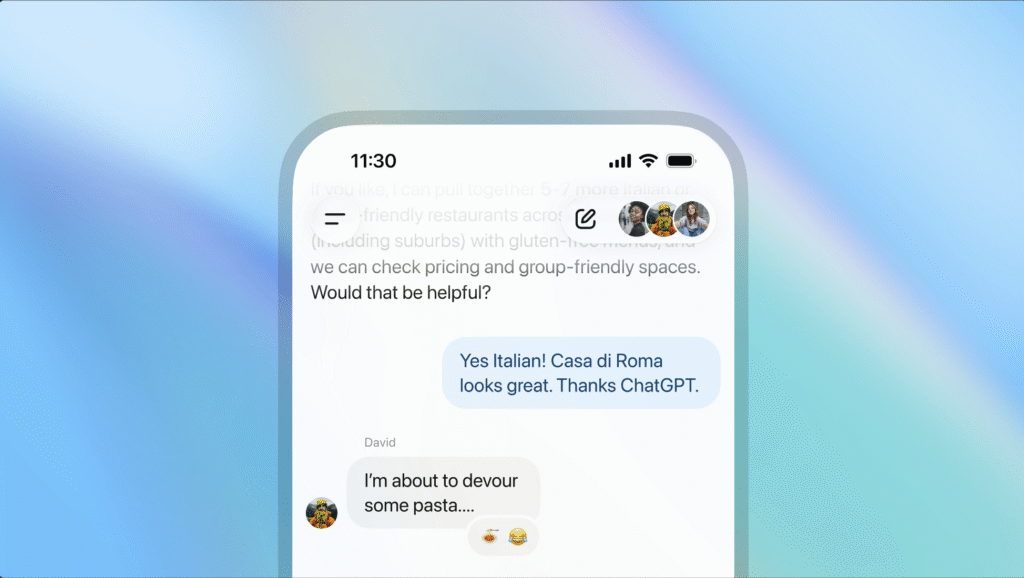
In this ChatGPT group chat review, You can find all in one space to grab all the latest AI. info. OpenAI officially launched ChatGPT Group Chat on November 13, 2025, marking a significant evolution in how people interact with artificial intelligence. This feature transforms ChatGPT from a solo AI assistant into a collaborative platform where multiple users can work together with AI in real-time conversations.
Group Chat allows users to bring friends, family, classmates, or coworkers into a shared conversation where everyone can collaborate while ChatGPT assists with planning, decision-making, brainstorming, and problem-solving. Unlike traditional one-on-one ChatGPT interactions, this feature creates a dynamic environment where up to 20 people can participate in the same conversation thread alongside the AI.
- ChatGPT Group Chat Guide: Features, How It Works, Benefits & Full Review
- ChatGPT Group Chat Launch Date and Current Availability
- Release Information
- Regional Availability
- Supported Plans
- How ChatGPT Group Chat Works
- ChatGPT Group Chat- Full Feature Breakdown
- Privacy, Safety & Data Handling
- ChatGPT Group Chat vs Regular ChatGPT
- How to Use ChatGPT Group Chat (Step by Step)
- Best Use Cases
- Benefits of ChatGPT Group Chat
- Better Collaboration
- Increased Productivity
- Easy Accessibility
- Enhanced Learning
- Limitations
- Final Verdict
- FAQs
- ChatGPT Group Chat Launch Date and Current Availability
ChatGPT Group Chat Launch Date and Current Availability
Release Information
Group Chat launched as a limited pilot program on November 13, 2025. OpenAI is currently testing the feature in select regions to gather early user feedback before expanding globally.
Regional Availability
Currently available only in these pilot countries:
- Japan
- New Zealand
- South Korea
- Taiwan
OpenAI plans to expand availability after collecting feedback, but no global rollout timeline has been announced.
Supported Plans
Group Chat is available across all plans:
- Chatgpt Free
- Chatgpt Go
- Chatgpt Plus
- Chatgpt Pro
It works on both web and mobile (iOS & Android).
How ChatGPT Group Chat Works

Image credits to OpenAI
Creating a Group Chat
- Click the people icon in any chat
- Generate an invite link
- Share it with participants
- Up to 20 people can join in a chat
When someone is added to an existing one-on-one chat, ChatGPT creates a copy of the conversation as a new group chat. Your private chat remains untouched.
Profile Setup
Every participant must set up:
- Name
- Username
- Profile photo
ChatGPT can reference profile photos for personalized content generation.
AI Model Used
Group chats are powered by GPT-5.1 Auto, which dynamically selects the best model based on:
- Task complexity
- User subscription level
- Conversation context
Conversational Behavior
ChatGPT in group chats can:
- Follow conversation flow
- Wait before responding
- Respond when tagged with “@ChatGPT”
- React with emojis
- Reference profile photos when asked
ChatGPT Group Chat– Full Feature Breakdown
Search & Web Browsing
Get real-time information with live web access.
File Sharing
Upload:
- Documents
- PDFs
- Images
- Spreadsheets
ChatGPT can analyze files in the group.
Image Generation
Supports image creation using DALL-E, including personalized images.
Voice Capabilities
- Voice input
- Dictation
- Transcription
Custom Instructions
Group specific instructions are separate from personal ones. You can set tone, detail, style, and behavior unique to that group.
Participant Limit
Each group can have 1 to 20 people. Anyone with the invite link can join until the cap is reached.
Privacy, Safety & Data Handling
No Personal Memory
Group chats do NOT:
- Access your personal ChatGPT memory
- Store group conversations as memory
- Use your private chat data
Data Separation
- Group chats appear in a separate sidebar
- Private one on one chats remain untouched
- Invite links can be reset anytime
Member Controls
- Anyone can leave anytime
- Members can remove others except the creator
- Everyone can delete their own messages
- Notifications can be muted
Safety Controls for Under 18 Users
When a minor joins:
- Sensitive content filters enable automatically
- Parents can disable group chats entirely
- Parents can set quiet hours
- Safety alerts are available for certain cases
ChatGPT Group Chat vs Regular ChatGPT
Key Differences
| Feature | One on One | Group Chat |
|---|---|---|
| Participants | 1 | Up to 20 |
| Memory | Uses personal memory | Personal memory disabled |
| Custom Instructions | Account wide | Group specific |
| AI Response Pattern | Replies to every message | Replies selectively |
| Rate Limits | Every message counts | Only AI responses count |
| Profile | Optional | Required |
Rate Limits
User to user messages are unlimited.
Only ChatGPT’s messages count toward rate limits.
How to Use ChatGPT Group Chat (Step by Step)
Step 1: Access
Click the people icon on web or mobile.
Step 2: Invite Members
Share the generated invite link.
Step 3: Configure Settings
- Set group custom instructions
- Manage notifications
- Change group name
Step 4: Collaborate
- Tag ChatGPT when needed
- Upload files
- Generate images
- Use reactions
Step 5: Apply to Your Use Case
- Trip planning
- Study groups
- Content collaboration
- Business workflows
Best Use Cases
Businesses
- Project management
- Brainstorming and ideation
- Report drafting
- Data analysis
- Marketing planning
- Sales pitch refinement
Students
- Homework groups
- Study sessions
- Exam prep
- Group projects
- Language learning
Creators
- Scriptwriting
- Story development
- Content planning
- Design brainstorming
- Visual generation
Personal Use
- Trip planning
- Event coordination
- Home design ideas
- Decision making with friends
Benefits of ChatGPT Group Chat
Better Collaboration
- Real time shared AI assistance
- Everyone sees the same output
- No more copy pasting from separate chats
Increased Productivity
- Faster decision making
- Streamlined workflows
- Automated tasks through group prompting
Easy Accessibility
- Works on all plans
- Simple setup
- Mobile friendly
Enhanced Learning
- Group explanation and feedback
- AI guided study groups
- Better comprehension through discussion
Limitations
Availability
Only available in four countries during pilot.
Technical Limits
- Max 20 users
- No end to end encryption
- Model quality varies by subscription
- No integration with external apps yet
Privacy Considerations
- Link based access can be misused
- Business users must avoid sharing sensitive data
AI Limitations
- Occasional inaccuracies
- Misunderstanding social cues
- Inconsistent timing of responses
Final Verdict
ChatGPT Group Chat is a major leap in collaborative AI. It transforms ChatGPT from a personal assistant into a shared workspace where teams, students, and creators can collaborate with AI in real time.
It’s powerful, easy to use, available across all plans, and perfect for:
- Study groups
- Small teams
- Creative projects
- Trip planning
- Real time decision making
While it’s limited to a few countries and capped at 20 participants, it’s one of OpenAI’s most innovative features yet — and absolutely worth trying if it’s available in your region.
For info on the all new ChatGPT 5.1, Read: ChatGPT 5.1 Review: Features, Performance, Modes & Complete Guide
FAQs
1. Is ChatGPT Group Chat available worldwide?
No, only in Japan, New Zealand, South Korea, and Taiwan as part of the pilot.
2. Does it cost extra?
No. Available on all plans including Free.
3. How many people can join?
Up to 20 participants.
4. Does it use my personal memory?
No. Personal memory is disabled in group chats.
5. Can I remove members?
Yes, except the creator. Anyone can leave anytime.
6. Do group chats count toward message limits?
Only ChatGPT’s responses do. User messages are unlimited.
7. Is it safe for minors?
Yes. Automatic safety filters activate when anyone under 18 is present.
8. Can I use this for business?
Yes, but avoid sharing sensitive or confidential data.
9. Does it sync with Projects?
No, Projects are separate workspace tools.
10. When will it launch globally?
No timeline announced yet.