ChatGPT 5.1 Review: Features, Performance, Modes & Complete Guide
Image credits to Openai
OpenAI surprised the AI community with the unannounced release of ChatGPT 5.1 — a major upgrade that directly responds to user concerns after GPT 5’s earlier launch. Many expected this update in December, but the rollout arrived early as OpenAI worked to address feedback that GPT 5 felt “cold” and less conversational compared to earlier models like GPT 4o.
ChatGPT 5.1 shifts OpenAI’s focus from pure computational strength to a much more refined user experience. It introduces two new model variants — Instant and Thinking — along with eight customizable personality presets. The upgrade improves reasoning accuracy, instruction following, tone warmth, and overall consistency.
- ChatGPT 5.1 Review: Features, Performance, Modes & Complete Guide
- Release Timeline & Availability
- Official Launch
- Rollout Schedule
- GPT 5.1 Model Variants: Instant vs. Thinking
- Revolutionary New Features in ChatGPT 5.1
- Performance Benchmarks
- Safety Upgrades
- Multimodal Improvements
- GPT 5.1 vs. GPT 4o vs. GPT 5 — Full Comparison
- Multimodal Capabilities & Memory
- Real World Use Cases
- Performance Improvements
- Limitations & Ethical Considerations
- Verdict: Who Should Use ChatGPT 5.1?
- FAQs
- Release Timeline & Availability
If you’re a ChatGPT Plus, Pro, Go, or Business subscriber, ChatGPT 5.1 begins rolling out immediately, with free users getting access shortly after. The update includes major improvements in math reasoning, coding capabilities, and reliability — while returning the warmth and conversational feel users loved in GPT 4o.
Release Timeline & Availability
Official Launch
ChatGPT 5.1 was launched on November 12, 2025, with immediate rollout for paid subscribers.
Rollout Schedule
Week 1:
- Instant access for Plus, Pro, Go, and Business users
- Enterprise/Education customers receive a 7 day early access toggle
- Staggered rollout to maintain stability
Week 2 onwards:
- Free users receive GPT 5.1 gradually
- API availability for both Instant and Thinking models
- GPT 5 Pro automatically upgrades to GPT 5.1 Pro
Legacy Model Access
OpenAI now allows older versions (GPT 5 Instant, Thinking, and Pro) to remain available for three months. This ensures stability and avoids the backlash that happened when GPT 5 originally replaced older models too abruptly.
GPT 5.1 Model Variants: Instant vs. Thinking
GPT 5.1 Instant
Optimized for speed, warmth, and everyday tasks.
Highlights:
- Natural, warm conversational tone
- Enhanced instruction following
- Adaptive reasoning for simple vs. complex queries
- Stronger math and coding performance
- Context window up to 32K (128K for enterprise)
Best for:
Brainstorming, general chat, writing, customer queries, everyday tasks.
GPT 5.1 Thinking
Optimized for deep reasoning and multi step problem solving.
Highlights:
- Adaptive thinking time
- Clearer explanations with less technical jargon
- Extended reasoning for coding, analysis, scientific questions
- Context window up to 196K
- “Light,” “Standard,” “Extended,” and “Heavy” reasoning modes
Best for:
Coding, scientific research, analytics, proofs, complex reasoning tasks.
Revolutionary New Features in ChatGPT 5.1
Adaptive Reasoning
ChatGPT 5.1 intelligently decides how much reasoning is needed per question.
Simple questions get instant answers.
Complex ones get deeper chain of thought processing.
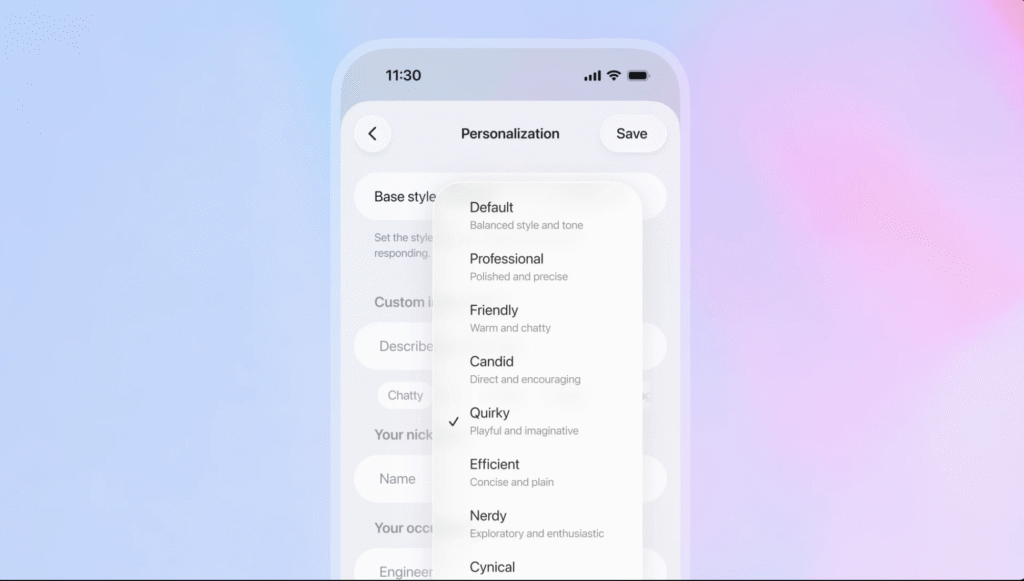
Eight Personality Presets
OpenAI introduces eight built in tones for different use cases:
- Default
- Professional
- Friendly
- Candid
- Quirky
- Efficient
- Nerdy
- Cynical
Each offers a distinct communication style, and advanced sliders for tone, conciseness, formatting, and emoji usage are gradually rolling out.
Stronger Instruction Following
ChatGPT 5.1 fixes one of GPT 5’s biggest complaints: ignored instructions.
Now, the model reliably follows:
- Word counts
- Format rules
- Tone guidelines
- “Always do X” instructions
- Structural outlines
Want to build AI agents faster? Read: OpenAI AgentKit: The Ultimate Toolkit to Build and Deploy AI Agents Faster
Performance Benchmarks
Math (AIME Performance)
GPT 5.1 significantly improves advanced math reasoning with higher accuracy and fewer logic mistakes due to adaptive reasoning.
Coding (Codeforces & SWE bench)
The upgrade improves coding quality, debugging, and algorithmic reasoning. GPT 5 already exceeded previous models, and 5.1 goes further with better instruction following and deeper chain of thought when needed.
Safety Upgrades
ChatGPT 5.1 is more robust against jailbreak attempts, with major improvements in disallowed content detection. Emotional reliance, harmful instructions, and unsafe behaviors are more tightly regulated.
Multimodal Improvements
GPT 5.1 enhances accuracy for:
- Chart interpretation
- OCR
- Spatial reasoning
- Image text synthesis
- Visual analysis
GPT 5.1 vs. GPT 4o vs. GPT 5 — Full Comparison
Architecture & Reasoning
- GPT 4o: Strong general model
- GPT 5: Better logic but robotic tone
- GPT 5.1: Combines warmth + intelligence with adaptive reasoning
Context Window
- GPT 4o: Limited
- GPT 5: Up to 400K (API)
- GPT 5.1: Same max windows, but better long context coherence
Tone & Personality
- GPT-4o: Warm but repetitive
- GPT-5: Accurate but cold
- GPT-5.1: Warm, playful, customizable
Coding
- GPT 5 → Big jump
- GPT 5.1 → Further improvement + better instruction adherence
Speed
- GPT 5.1 Instant = fastest model
- GPT 5.1 Thinking = faster than GPT 5 Thinking on simple tasks
Multimodal Capabilities & Memory
Multimodal Features
GPT 5.1 retains full image and audio input support with:
- Better OCR
- Better chart/diagram analysis
- Stronger spatial reasoning
Memory Architecture
Three types of memory:
- Session context (conversation window)
- Persistent memory (cross chat preferences)
- Retrieval (RAG / external documents)
OpenAI improved automatic memory management so relevant details remain prioritized without overwhelming the model.
Real World Use Cases
Developers
- Full stack prototyping
- Debugging with adaptive reasoning
- Large codebase analysis
- Step by step explanations
Businesses
- Customer service automation
- Strategic analysis with long documents
- Team workflows with tone presets
- Reliable automation via improved instruction following
Creators
- Social content with personality presets
- SEO writing with consistent voice
- Long form research with extended context
Researchers
- Literature synthesis
- Data interpretation
- Academic writing assistance
- Image based scientific reasoning
Students & Teachers
- Step by step tutoring
- Homework help
- Study Mode
- Lesson planning
- Accessibility support
Performance Improvements
Speed
Instant mode delivers extremely fast response times with minimal latency.
Thinking mode allocates time intelligently and reduces wasted compute.
Accuracy
- Fewer hallucinations
- Better factual grounding
- More consistent instruction following
Safety
- More resistant to jailbreak prompts
- Better filtering of harmful content
- Higher guardrail accuracy
Limitations & Ethical Considerations
Despite improvements, ChatGPT 5.1 still has limitations:
- Hallucinations can still occur
- Context windows remain finite
- Nuance and humor may be misunderstood
- Limited reasoning transparency
- Potential bias due to training data
- Not suitable for high stakes decisions without human oversight
Ethical considerations include privacy, accuracy, bias, academic integrity, and responsible usage guidelines.
Verdict: Who Should Use ChatGPT 5.1?
Best For:
- Developers
- Content creators
- Businesses and enterprises
- Researchers and analysts
- Students seeking guided learning
Use With Caution For:
- Medical, legal, financial decisions
- Sensitive or private data
- Zero error environments
Not Ideal For:
- Replacing expert judgment
- Real time mission critical systems
- Tasks requiring guaranteed factual accuracy
FAQs
1. Is ChatGPT 5.1 available for free users?
Yes, but rollout is slower than paid plans.
2. What is the difference between Instant and Thinking modes?
Instant = fastest and conversational.
Thinking = deeper reasoning and structured logic.
3. Does ChatGPT 5.1 have internet access?
Yes, for paid users with web browsing enabled.
4. Does it generate images?
Not directly. Use DALLE inside ChatGPT for image generation.
5. Is it safer than GPT 5?
Yes — stronger jailbreak resistance and improved guardrails.
6. Is GPT 5.1 good for coding?
Yes, major improvements in debugging, logic, and instruction following.
7. Does it remember previous chats?
Yes, via persistent memory (optional).
8. What’s the context window?
Up to 196K in ChatGPT and up to 400K via API.
9. Can it analyze images?
Yes, with improved accuracy and reasoning.
10. Can GPT 5.1 replace human experts?
No — it’s an augmentation tool, not a replacement.