The era of complex, disjointed AI workflows is over. With OpenAI’s AgentKit, developers and enterprises can now design, deploy, and optimize AI agents seamlessly—without spending months on integration or frontend development.
Whether you’re building a customer support bot, a sales assistant, or a research automation tool, AgentKit combines everything you need into one powerful, visual toolkit. Let’s break down what makes OpenAI’s AgentKit a game-changer for the AI development ecosystem.
What Is OpenAI AgentKit?
OpenAI AgentKit is a modular toolkit designed to help developers create, deploy, and optimize intelligent AI agents efficiently.
Before AgentKit, teams had to rely on fragmented tools, manual prompt tuning, and multiple integration points. OpenAI has now unified all these steps under one streamlined platform with three major components:
- 🧠 Agent Builder – A visual, drag-and-drop interface for building AI workflows.
- 💬 ChatKit – A customizable toolkit for embedding chat-based agent UIs directly into products.
- 🧩 Connector Registry – A central hub for managing data sources and integrations.
Together, these features make it easier for developers to go from idea to live agent in just hours instead of weeks.
1. Agent Builder: Visualize and Version AI Workflows
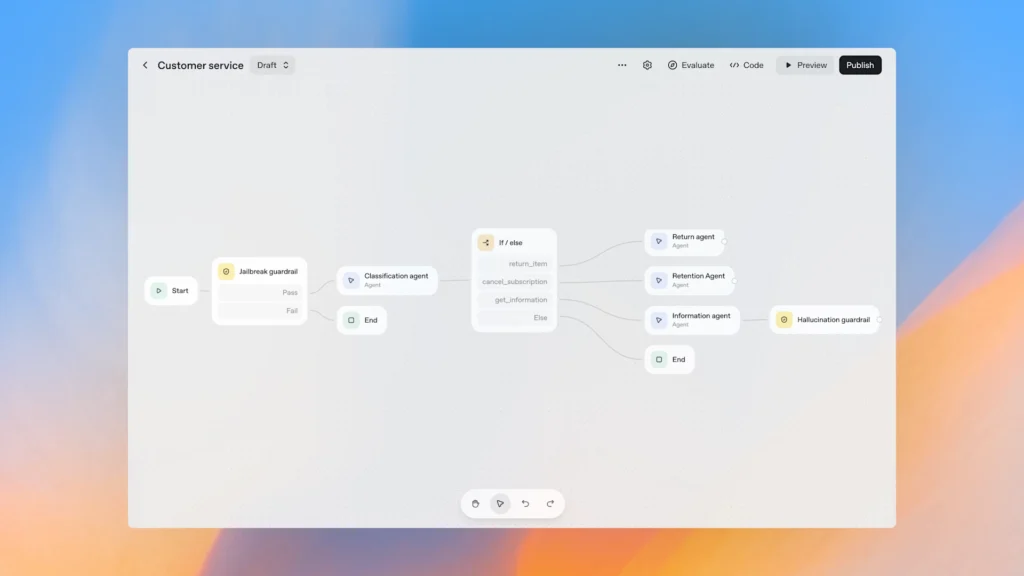
Building multi-agent workflows used to require heavy coding and orchestration. With Agent Builder, you get a visual canvas that lets you design workflows intuitively.
Key highlights:
- Drag-and-drop interface for logic, models, and connectors.
- Real-time evaluation and versioning for faster testing.
- Prebuilt templates to help you get started instantly.
- Custom guardrails to ensure compliance and prevent misuse.
Companies like Ramp and LY Corporation have already demonstrated how Agent Builder cuts development time by more than 70%, reducing what once took months into just a few hours.
2. Connector Registry: Streamlined Data Management
The Connector Registry gives enterprise teams control over how data flows between AI agents and external tools.
It consolidates all connectors into a single admin dashboard, integrating seamlessly with:
- Dropbox
- Google Drive
- SharePoint
- Microsoft Teams
This not only improves data governance but also ensures secure and consistent access across multiple OpenAI products.
3. ChatKit: Embedding AI Conversations Made Simple
Embedding conversational agents in apps or websites can be technically challenging—but ChatKit changes that.
With ChatKit, developers can:
- Integrate chat UIs within an hour
- Customize themes and UX
- Support streaming responses and in-chat reasoning
Canva, for instance, built a developer support agent in under an hour using ChatKit—transforming static documentation into a live, conversational experience.
Similarly, HubSpot and LegalOn have used ChatKit to power customer support and internal automation assistants.
4. Evals and Reinforcement Fine-Tuning: Smarter Optimization Tools
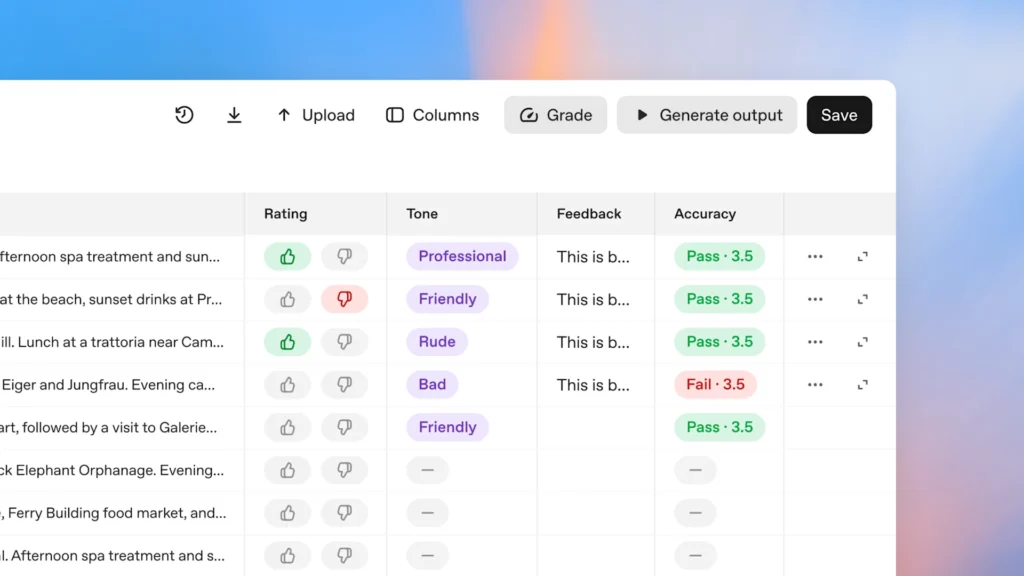
To make agents more reliable, OpenAI has expanded its Evals platform with new capabilities:
- Datasets for scalable testing
- Trace grading for workflow-level evaluations
- Automated prompt optimization to enhance performance
- Third-party model support for benchmarking against competitors
For advanced customization, Reinforcement Fine-Tuning (RFT) allows developers to train OpenAI models like o4-mini or GPT-5 to handle domain-specific tasks or call tools at the right time.
This results in smarter, faster, and more accurate AI agents—tailored exactly to a company’s needs.
OpenAI AgentKit vs Traditional AI Development
| Feature | OpenAI AgentKit | Traditional AI Development |
|---|---|---|
| Workflow Design | Visual drag-and-drop (Agent Builder) | Manual orchestration |
| Data Integration | Centralized Connector Registry | Scattered integrations |
| Chat UI Deployment | Ready-made via ChatKit | Requires frontend coding |
| Evaluation Tools | Built-in Evals and RFT | Manual testing |
| Time to Deploy | Hours | Weeks or months |
Pros and Cons of OpenAI AgentKit
✅ Pros:
- All-in-one AI development environment
- Easy-to-use visual workflow builder
- Strong safety and compliance guardrails
- Optimized for enterprises and developers
- Seamless integration with existing OpenAI products
⚠️ Cons:
- Some features (like Connector Registry) are in beta
- Requires Global Admin Console for enterprise use
- Advanced customization may need developer experience
Pricing & Availability
As of October 2025, the following AgentKit tools are available:
- Agent Builder – Beta access
- ChatKit – General availability
- Evals – Fully available
- Connector Registry – Rolling out in beta for enterprise users
All tools follow standard OpenAI API pricing, with additional enterprise management features through the Global Admin Console.
Why AgentKit Matters for the Future of AI
OpenAI’s AgentKit bridges the gap between AI research and real-world applications. By offering visual design, deployment, and optimization tools in one place, it empowers both startups and large organizations to innovate faster.
This unified ecosystem could redefine how AI agents are built—making intelligent automation more accessible to everyone.
Conclusion
OpenAI AgentKit isn’t just another developer toolkit—it’s a complete AI development ecosystem designed for the next generation of intelligent, autonomous systems.
Whether you’re scaling customer support or building intelligent internal tools, AgentKit offers everything you need to go from idea to production in record time.
👉 Explore more AI innovation stories and comparisons at PreviewKart.com.
FAQs: OpenAI AgentKit Explained
1. What is OpenAI AgentKit used for?
AgentKit helps developers create, deploy, and optimize AI agents using tools like Agent Builder, ChatKit, and Evals.
2. Is AgentKit free to use?
No, it’s included under OpenAI’s standard API pricing. Some enterprise tools are in beta access.
3. Can non-developers use AgentKit?
Yes! The visual Agent Builder interface allows even non-technical teams to design workflows easily.
4. What’s the difference between ChatKit and Agent Builder?
Agent Builder helps design the backend logic, while ChatKit helps integrate those agents into your app’s frontend.
5. When will AgentKit be fully available?
Most tools like ChatKit and Evals are live, while Agent Builder and Connector Registry are expanding beta access throughout 2025.